What will {EncodedTitle} do to my naming convention?
This will also:
- Replace the following characters with an underscore: " .,:;<>@[]\()$&+/=?#%{}|^~`’ if there were more than 1 replacements in a row this would be replaced with a single underscore.
- Removes diacritics, e.g. ä will become a.
- Replaces language-specific special characters with their equivalent. Includes the following: ß,æ,Æ,œ,Œ,ø,Ø,ł,Ł,ı
As part of your naming convention you may not want to use underscores for these, using the instructions below you can replace _ with something else, using a Request Variable:
Replace underscores in {EncodedTitle}
Our example, replace /new_teams_url to use hyphens instead e.g. /new-teams-url or no separator /newteamsurl
- Go to Admin > Templates > Request Variables
- Click +New Request Variable
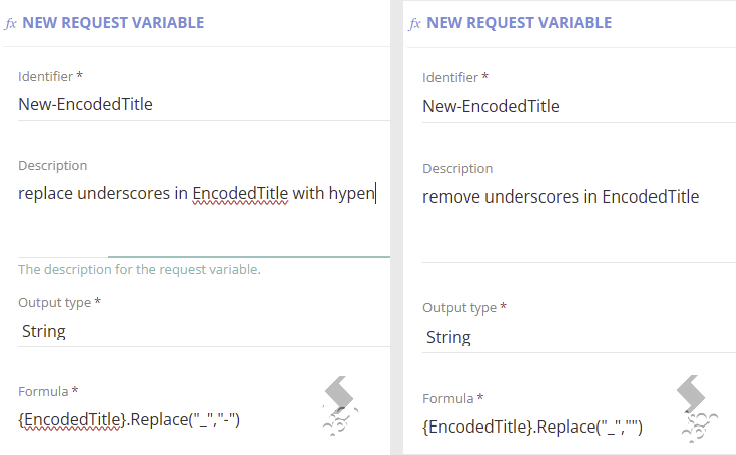
- Set a unique identifier for this variable. e.g. 'NewEncodedTitle'
- Set the Output type = String
- In the Formula field use the following: {EncodedTitle}.Replace("_","-") or {EncodedTitle}.Replace("_","")
- Link the Request Variable to the Service Definition by going to Admin > Service Definition > Request > Request Variable Reference
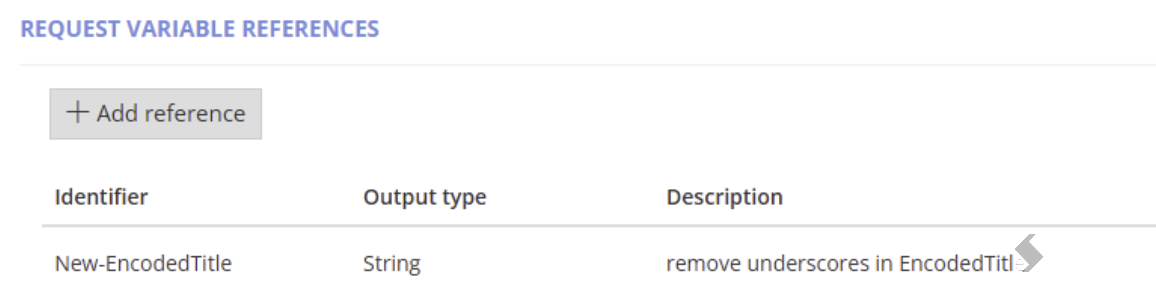
- Click +Add Reference
- Select the name of the Request Variable created earlier.
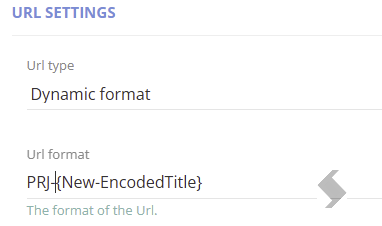
- Add the Request Variable name to the Title formula or URL format wrapped in { }
- Save the Service Definition
To view more examples of formulas to use, see the help icon on the Request Variables page
