Please review the Product Roadmap to see future Releases: Product Roadmap | SnapOn Software | Software That Clicks
Below is a list of the new feature and maintenance releases for Intake in 2025/2026
Version 1.0 - Released Jan 21, 2026
Expand to see subsequent Patches for Intake v1.0
Patch Published Aug 11, 2026 [20260724]
Stability Fixes
- 2540 – Improved the behavior of required Radio Button fields in Intake Forms. Required radio button fields now automatically select and submit the first option when no default value is configured. Optional radio button fields can now start with no selection, and users can clear an existing selection using the new Clear (X) option.
- 2536 – Fixed an issue where Intake Forms could not be submitted when an optional multi-select Choice field was left blank. Forms now submit successfully when the associated SharePoint column is not required and no Intake Form validation rule requires a value.
Patch Published by May 29, 2026 [20260526]
Stability Fixes
- 2388 – Fixed an issue where the Style Editor would continuously load, preventing access to the CSS editor in SharePoint environments.
- Monaco Editor was updated to use inline blob workers to support SharePoint's Content Security Policy (CSP), ensuring JSON, CSS, HTML, and TypeScript language services load correctly.
- A related production build issue that caused worker initialization failures was also resolved.
- 2444 – Fixed an issue where users were unable to insert hyperlinks in the Rich Text/HTML element on public forms. This has been resolved and hyperlink insertion now works correctly.
Enhancements
- 2431 – Added a tenant-wide setting that allows administrators to configure a custom domain URL across the entire tenant.
New Features:
Multi-lingual forms
You can now choose the language your form will be displayed in when embedding a form or sharing a link to it.
While you could always customize and translate column labels and validation error messages, choosing a form language would now translate all system buttons and messages, as well as set the form direction to RTL or LTR based on your selected language.
Selecting a form language can be found under form settings in the toolbox:
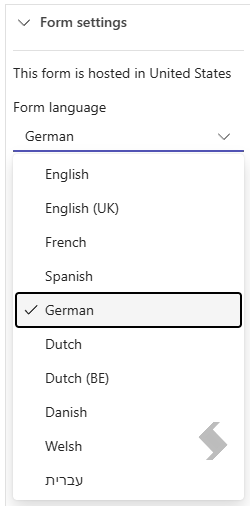

Click preview, share or scan QR code to view the form in your selected language.
References: Sharing and Embedding
Multi-lingual designer
When opening the intake forms designer, the app will now let you choose the language for the designer.
This language does NOT apply to the form itself, once shared or embedded.
To select a language, click on the top right corner profile button:
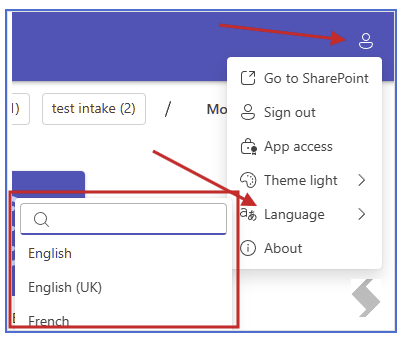
If you are using public-forms feature as part of KWIZ Forms in SharePoint, the language of the designer will auto-detect and try to match your site language
Geo location
You can now select a region where you would like us to store your form settings.
While your data is never stored on our servers, and will always be submitted directly to your environment, we keep the form settings on our servers so that we can render the forms fast for anonymous users, without having to access your data source.
By default, we keep all forms in a data center in the US, but when saving a form you will have the opportunity to select where you want to host it:
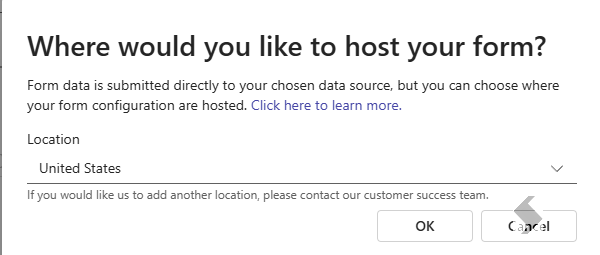

Tip: Moving a form is not possible, but it is easy to duplicate the form and save it in a new location.
Version 0.2 - Released Nov 12, 2025
Expand to see subsequent Patches for Intake v0.2
Patch Published 12 05 2025
We have added a few new controls to display yes/no and number fields:
- Yes/no fields can now show a checkbox, switch, like button or a like & dislike buttons:


- Number fields can now be displayed as a rating stars or a slider:


New Features:
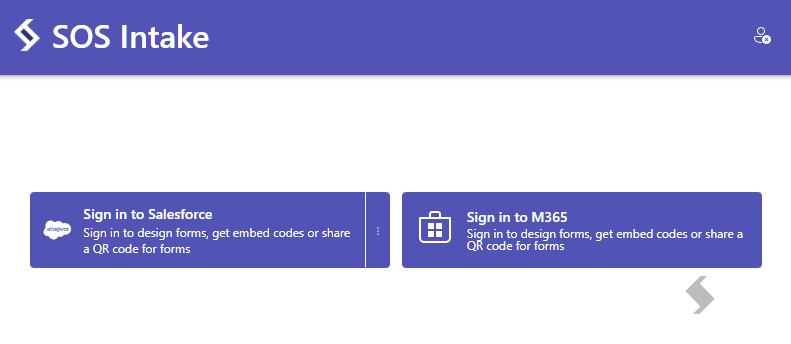
M365 standalone data source
Introducing a new standalone data source for M365!
You can now use intake forms without a dependency on installing KWIZ Forms, using the stand alone version of intake.
KWIZ Form's Public Forms feature is still supported, and allows quick and easy access to creating intake forms in an integrated way into SharePoint.

References: Getting started with M365
Style Editor
You can now add CSS styles to your forms, allowing you to control the look & feel of the form to match your brand and/or the site it is embedded in.
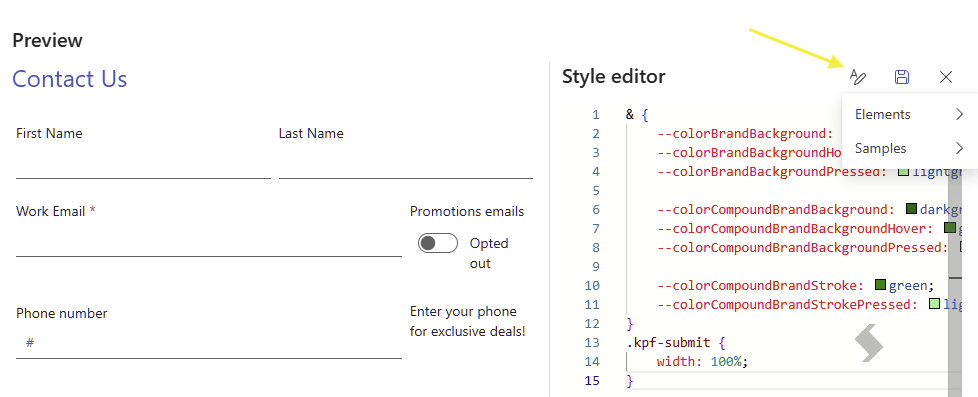
References: Styling your form
Support libraries in M365
You can now upload files into a document library instead of list item attachments when using M365 data source.
References: Submitting Forms - Working with Libraries
Drafts
Intake forms will now keep unsubmitted forms as drafts automatically, allowing the user to pick up where they left off when returning to the page.
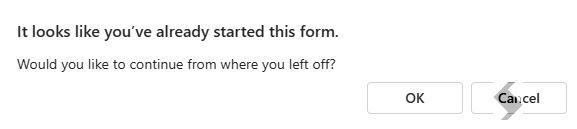
References: Submitting forms - Drafts
 Sharing options
When generating a share-link or embed code, you can now set up options for that link or code, such as selecting a theme or pre-filling values.
- Theme: by default, the form will auto-detect the device settings to choose between dark or light mode, but you can choose a specific theme to bypass that behavior.
- Default values: you have an option to pass values to your form, dynamically, as part of the link or data attribute. This allows you to reuse a form in multiple places without having to duplicate the form.
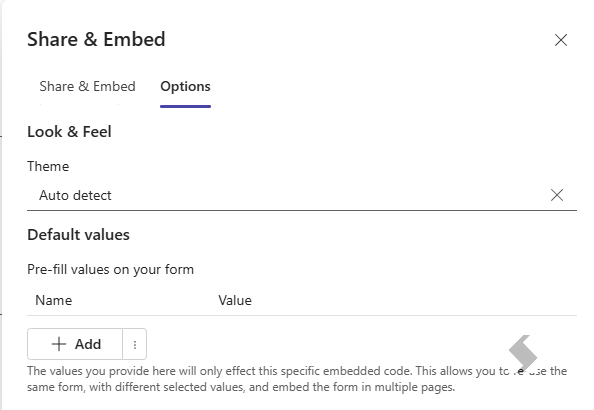

References: Setting up Sharing Options
Maintenance - Expand to see
UI/UX Fixes
- Dropdown filter: dropdowns with long list of options will now filter when the user starts typing
- Salesforce featured entities: when connecting to salesforce data source, the top frequently used entities will be featured and displayed in the top nav bar for easy and quick access
- Fixed an issue where the top app menu would disappear when scrolling on pages that had many forms that went beyond triple the page height
Stability Fixes
- When uploading files, a failed file will now report a visible error to the user giving him to opportunity to retry or skip the file
- Dropped dependency on KWIZ Forms services or app registration, allowing sos intake to publish versions independently
- Rehauled and added many more options when creating or editing columns with both salesforce and M365 data sources
- Fixed the rich text editor in the designer to allow interacting with the image and link picker popups
- Deployment architecture change to use deployment slots with zero downtime publishing and deployments
- Improved the built-in regular expression validation for emails to accept . in a valid email address
References: Issue 2222
Version 0.1 - Released September 23, 2025
New Features & Enhancements
Standalone version
Add a standalone version of SOS Intake to allow customers to use different data sources in addition to our SharePoint List data source.
This version introduces a whole new server side design and architecture, separated from KWIZ Forms and dedicated for SOS Intake.
All pre-existing forms have been migrated seamlessly to the new architecture on day 1, with 0 downtime.
References: Intake Documentation
Salesforce data source
Added a new data source type for SOS Intake forms, allowing you to connect to Salesforce and create forms that submit into a Salesforce object, such as a support case or a marketing lead.
References: Get started with Salesforce
Embed improvements
Embedding a form now allows you to select a theme, as well as default values to be passed to your form
References: Embedding a form inside another site
Checkbox and Choice controls
You can now insert a checkbox or choice cell without having to create a column, so you can use them to control other cells visibility
Maintenance - expand to see stability and UI fixes
UI/UX Fixes
- Multi entity view: We replaced the breadcrumbs control with a more useful tag control, showing you all the objects that have forms configured and when clearing the selection - showing you a useful screen with all your public forms for quick access to embed codes
- Gallery picker: creating a new form will no longer open the gallery picker, allowing you to start designing your form - or access the gallery using the open gallery button
Stability Fixes
- Improved the built in email validation to allow -
- We've improved the performance and stability of forms in different situations