Please review the Product Roadmap to see future Releases: Product Roadmap | SnapOn Software | Software That Clicks
Below is a list of the new feature and maintenance releases for CMS365 in 2025/2026
Version 1.3 - Released April 29, 2025
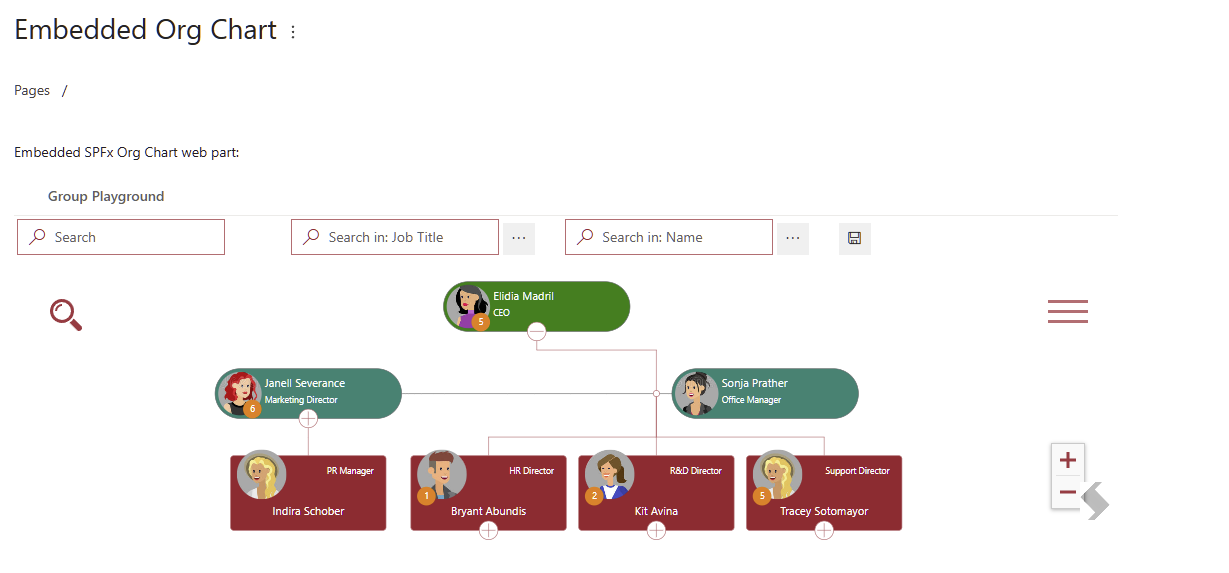
Embedding SPFx web parts into pages
- Embed SPFx web parts into CMS365 pages, and have them resize automatically.
- The embed file picker will allow you to simply select the site pages library and select the pages you with to embed
References: read more about Embedding Components
Custom page variables
- Expanded the page variables you can add, from Title, Description and Authors, to include custom created page variables.
- Designers can create text, date and choice columns and use them as variables for pages, providing better structure to your content, and embed variables into your page layouts to enforce uniform content editing experience.
References: read more about Custom Variables: Page Tokens
New & Improved site navigation
We added a dedicated page to manage your site navigation, allowing designers to quickly reorder pages and select an automatic sorting option, as well as the ability to specify a different site logo for specific sections of your site. Reordering pages will no longer create a draft that needs to be approved.
References: Site Navigation
Inline text formatting
- 1987 - Added more text formatting options and coloring to inline text elements, allowing you to emphasize your content without moving it to a new block element.
- This will expand on the basic bold, italic, underline options that were available in earlier versions.
Trial and license
- 1809 - With this release, CMS365 will now require a license or an active trial. Sites without an active license or trial will render in read-only, so your content will remain accessible.
Maintenance
UI/UX Fixes
- YouTube Embed: Fixed an issue with embedding YouTube videos from unrecognized URL formats
- Auto size Embed: Embedding pages from SharePoint will attempt to automatically resize them to fit the content
- Updated semantic colors: Updated the semantic colors used by admonition blocks and inline text format
Stability Fixes
- We have addressed a lagging issue during long editing sessions
- We have fixed an issue with content edited in an admonition block or table cell not being saved unless the user clicks outside the block first
- Stability improvements in some situations
References: Issues 2108, 2074, 2061, 2062, 2068, 2082, 2091, 2092, 2111, 2115
Expand to see subsequent patches for v1.3
Patch Published Jan 07 2026
Minor improvements to links manager:
- Scanning and auto-fixing broken links and non-permalinks will now support in-page links to headers. For example, if you have a link in a page to a sub-header in the same page (like: footnotes) the links manager will now not report that as a broken link, and will not attempt to fix it.
- Added filters to external links report to help authors quickly work through external links to verify or fix them.
References: Links Management
Patch Published 12 15 2025
- Added support for custom variables when exporting or importing content from CMS365 sites.
References: Export from another CMS365 site, Importing From Another CMS365 site
Patch Published 12 08 2025
- 2279 - When exporting content from a CMS365 site with custom reusable content and custom page layouts, some customers experienced and issue when importing the data into a new CMS365 site, the layout IDs and reusable content IDs were not updated to the correct ones on the target site. That would lead to some reusable content missing from the page, or referencing the wrong content, as well as pages losing their layout assignments.
Patch Published 11 06 2025
- This page fixes an issue with image positioning not working when an image is added into a paragraph that also contain other elements or text.
Patch Published 10 23 2025
Customers who created many custom page variables might face an issue where pages no longer load. The list of column names might be too long and restricted by query length.
- This patch separates loading CMS365 pages and the metadata needed to render the app, from loading custom page variables. Custom page variables are now loaded per page, when viewing a page or editing a page, with the page's content.
- This approach fixed another minor issue, where custom page variables were not rolling back to an older version when viewing a page's previous versions. With this patch, viewing older page versions will also show that version's custom variables.
Note: in edit mode, loading previous version will still only load the page content, that behavior was kept to prevent accidentally overwriting changes the author may have made. - You can now position images in your pages, using the gear icon to make images float to the left or right of the text.
References: issue 2250
Version 1.2
Draft Mode & Approvals
- Introduced a structured workflow for content creation, allowing drafts to be saved privately and submitted for approval before publishing.
References: Drafts & Approvals
Copy Markdown Button
- Users can now copy sections or entire pages as Markdown, making it easier to reuse content in AI tools and documentation workflows.
Zoho Desk Import
- Added support for importing content from Zoho Desk.
Resolve Conflicts on Save
- Added a merge changes UI to prevent content overwrites.
References: Resolve Conflicts on Save
Public Site Links
- Users can now log in to internal CMS sites from the public site, and improved link copying for internal and public site URLs.
Admonitions improvements, status: development
- Add inline admonitions to be able to highlight text inline in a paragraph.
- Addressed an issue where changes inside admonitions are lost if the user does not click outside the admonition block before saving.
Deploy CMS365 license checks and self-serve trials, status: development
- Activate the license checks on CMS365 sites, and add a self-serve trial activation allowing customers to try CMS365 using an activation code.
- Sites without an active subscription or trial will display as read only, allowing users to access all information but will not allow any authoring.
Maintenance
UI/UX Fixes
- Quote Formatting Fix: Resolved issues where blockquotes had unintended line breaks.
Stability Fixes
- We've improved the stability regarding category text fields in the side navigation.
- We've improved the stability of header links on public sites.
- We've improved the stability of left navigation scrolling into view.
- We've improved the stability of page scrolling when navigating.
Reference: 2024, 1742, 1910, 1986, 1988, 1989, 1998, 2001, 2005, 2014, 2032
Expand to see subsequent patches for v1.2
Patch Published March 21 2025
- Fixed an issue where a content zone that only has 1 image did not display the image correctly.
- Fixed an issue where adding an image into a page layout and resizing it broke the layout zone content.
Patch Published March 10 2025
- Addressed an issue where page layouts with optional content that were nested inside a non-optional section were not rendered correctly.
Patch Published March 04 2025
- 2064 - Addressed an issue where users who were granted permissions as part of the Everyone except external users built-in group did not get the correct role in CMS365