Please review the Product Roadmap to see future Releases: Product Roadmap | SnapOn Software | Software That Clicks
Below is a list of the new feature and maintenance releases for Forms in 2026
Version 3.2 Workflow Updates - Released May 22, 2026
Scheduled Workflows
We've brought all your workflow setup into one place! Activities, Scheduled Workflows, and Workflows are now managed from a single Workflow Setup page.
- You can now run workflows automatically on a time-based schedule, no manual trigger needed.
- Ability to run workflows automatically based on time or conditions
- Support for processing multiple items in a single run
- Great for summary, batch processing and consolidated notification scenarios
App-Triggered Workflow Support
Workflows can now respond to events generated by apps and integrations, such as Public Forms submissions.
- Must be opted into at the workflow level (disabled by default)
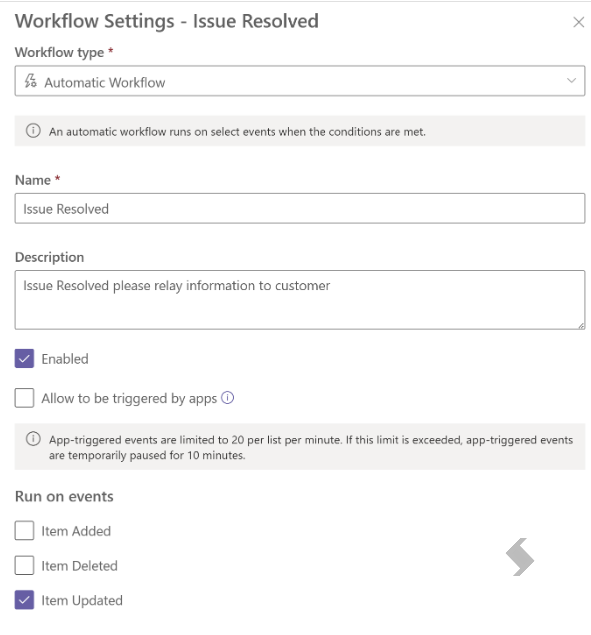
- Built-in safeguards prevent workflows from looping back on themselves
This is especially useful for Public Forms, submissions will now trigger your workflows as expected.
App-triggered events are limited to 20 per list per minute. If exceeded, events are temporarily skipped for 10 minutes.
Update Variable Activity
A powerful new activity that lets workflow designers create and compute named variables at runtime — no coding required.
Variables can be used across your entire workflow and support five types:
| Type | Example Use |
| Text | Combine first and last name into a full name |
| Number | Calculate a total price from quantity x unit cost |
| Date | Set a due date 7 days from today |
| Boolean | Check if a field contains a specific word |
| Collection | Count of join items in a multi-value field |
Variables you set early in a workflow are available to use in later steps, making it easy to build running totals, formatted values, or even a simple audit trail.
Stability Fixes
- 2376 – Fixed an issue where workflows were not being triggered when a form was submitted through a Public Form link.
- 2421 – Fixed an issue where opening a form in Lists would display a "Cannot Read Properties of Null" error.
- 2424 – Fixed an issue where the form would unexpectedly scroll back to the top while a user was filling it out, causing them to lose their place.
- 2433 – Fixed an issue where Yes/No fields displayed "True" or "False" instead of "Yes" or "No", and URL fields showed the field type name instead of the actual URL, when referenced in workflow activity tokens.
- 2434 – The "Allow run by apps" option is no longer shown in workflow settings for On-Premises environments.
References: 2424, 2376, 2421, 2433, 2434
Expand here to see subsequent patches for v3.2
v3.2 Patch to be Published June 14 2026 [20260612]
Stability Fix
- 2463 — Fixed an issue in Forms and Workflows where users could not copy/paste into the HTML editor. Paste functionality now works correctly.
v3.2 Patch Published June 01 2026 [20260427]
Stability Fixes
- 2411 – Fixed an issue where content from different collapsible sections overlapped when printing a form. A new client agent was introduced to improve the print process, ensuring all sections are displayed clearly and no content is hidden or overlapping.
- 2432 – Fixed an issue where the Print function generated a blank page instead of rendering the expected content. The print output now displays correctly.
- 2438 – Fixed an issue where the Datasheet View app was not working. The issue has been resolved and the app now functions correctly.
- 2445 – Fixed an issue where Lookup field values could not be added to multi-lookup fields when using the Update Variable activity. This has been corrected to ensure lookup values are added and updated properly.
- Resolved issues in SharePoint On-Premises Forms apps: To apply these fixes, install the latest Foundation WSP package (attached for your convenience).
- 2419 – Fixed an issue where the Copy Item activity did not copy attachments from the source list to the target list. Attachments are now transferred correctly during the copy process.
- 2423 – Fixed an issue where the “Add Item” activity did not work in User Triggered Workflows. This has been corrected so items can now be added successfully within user-triggered workflow processes.
Version 3.1 - Released March 26, 2026
ACS Retirement and RER Migration
Microsoft is retiring Azure ACS on April 2, 2026, which will cause KWIZ Classic Apps (SharePoint Add-ins) to cease functioning. Customers must transition to KWIZ Modern Apps before this date to ensure uninterrupted service.
Additionally, Remote Event Receivers (RER) that depend on Azure ACS will stop working.
KWIZ has implemented an automated migration path to Entra AD that extends RER support through July 1, 2027 — but this requires a one-time administrator action.
Reference: ACS Retirement and RER Migration
Stability Fixes
This release includes stability improvements across Forms, Print, Shared Filter, and Modern UI functionality.
Previously, users experienced issues when viewing or editing items with versioning, which could result in a blank page, and forms configured to open in the side panel would instead open in the standard SharePoint view. In addition, printing data with repeating rows could lead to missing information or errors. These issues have now been resolved. Forms now load correctly and open in the side panel as expected, and printing is more reliable with all data displayed accurately.
Several Shared Filter improvements have also been made, including fixes for Data View Plus connectivity in SharePoint SE, custom field mappings, text value filtering, user-based filtering, and consumer-provider configurations.
Additionally, an issue where the "Grant admin consent" button redirected to a "Page Not Found" error has been resolved, ensuring a smoother admin onboarding experience.
- 2370 – Fixed an issue where printing forms with repeating rows could occasionally result in missing data, crashes, or errors. The print process has been updated to ensure all form content is fully loaded before printing proceeds.
- 2373 – Fixed an issue where viewing or editing an item that includes versioning could result in a blank page. The form now loads correctly when versioning is enabled.
- 2374 – Fixed an issue where Kwiz forms configured to open in Side View were instead opening in native SharePoint. The application now correctly identifies the active view and opens forms in the expected layout.
- 2379 – Fixed an issue where the Grant admin consent for KWIZ Apps button redirected to a Page Not Found error. The admin consent page now loads correctly.
References: 2370, 2373, 2374, 2379
Expand here to see subsequent patches for v3.1
v3.1 Patch Published Apr, 21 2026 [20260414]
- 2413 – Fixed an issue where some forms could show an error when saving, especially when using Repeating Rows or Cascading Lookup columns. This has been resolved by improving how the system handles background data storage, ensuring forms now save smoothly and reliably without errors.
- 2411 – Fixed an issue where data from collapsible groups could overlap when printing a form. This has been resolved by improving the layout and formatting during print and PDF generation, ensuring all sections display clearly without overlapping.
- Resolved issues in SharePoint On-Premises Forms apps: To apply these fixes, install the latest Foundation WSP package (attached for your convenience).
- 2409 – Fixed an issue where workflows on forms could run inconsistently. This has been resolved to ensure workflows now execute reliably every time they are triggered.
v3.1 Patch Published Apr, 13 2026 (20260325)
- 2385 – Fixed an issue where the date field in forms displayed incorrectly, with misaligned calendar dates and the wrong day sometimes being saved. This has been corrected to ensure dates are shown and saved accurately
- 2390 – Fixed an issue where users could not run workflows without access to the top-level site and received an error message. This has been corrected so workflows can run properly without requiring additional permissions.
- 2392 – Fixed an issue where the KwizCom New Item Form could unexpectedly refresh while users were entering data, causing entered information to be lost when the same list was open in multiple browser tabs. This behavior is now properly handled.
- 2396 – Fixed an issue in the on-prem environment where the app continuously provisioned KWIZ Site Pages files. The validation logic has now been corrected to prevent repeated provisioning.
- 2398 – Fixed an issue in the RecAPPtcha settings where clicking the Back button reloaded the same settings page instead of returning to the parent settings page. The navigation logic has been updated so the Back button now correctly redirects users to the parent settings page.
- 2405 – Fixed an issue where the workflow redirect functionality on Modern Pages in Classic Experience did not work for user-triggered workflows. Users are now correctly redirected to the configured page after submitting the form.
- Resolved issues in SharePoint On-Premises Forms apps: To apply these fixes, install the latest Foundation WSP package (attached for your convenience).
- 2391 – Improved the Activity Editor panel usability for long field names and email content by adding a full-width expand option. Users can now switch the panel to full screen for more editing space and restore it back to the default size when needed.
- 2407 – Fixed an issue where the Get User Profile Property activity did not return certain user properties in some cases, such as DisplayName. The activity now correctly retrieves all supported profile properties.
- 2408 – Fixed an issue where the Email activity could add the same recipient twice when the email address differed only by letter casing. The validation logic has been updated to treat email addresses as case-insensitive and prevent duplicate recipients.
Version 3.0 - Released
New Workflow Designer
With our new Forms Workflow designer you will be able to setup workflows and activities from one location.
New Workflow Designer
With our new Forms Workflow designer you will be able to setup workflows and activities from one location.
We are combining the following setup pages:
- Activities - actions you would like to make, for example send and email or delete an item
- Scheduled Workflows - Running activities on a scheduled basis
- Workflows - Using user buttons or automated triggers to run activities
All will now be found in the Workflow Setup page, simply open Kwiz Apps and select Workflows

All existing Activities & Scheduled workflows will automatically be moved to the new location, no user action is required!
Your workflows will be grouped by their trigger type, allowing you to easily review all workflows setup for your list.
The option to import and export have not changed and will continue to work as they do now.
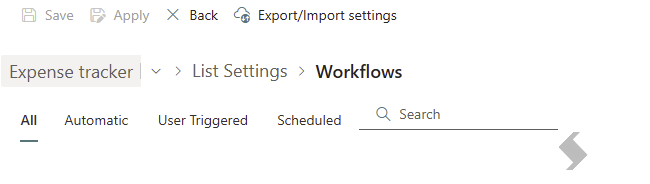

Create New Workflows
To create a new Workflow you will first define the trigger type to be used:
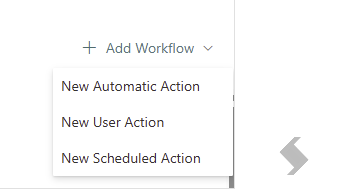

Depending on the action you choose you will be able to setup the name and trigger
Configure Conditions & Activities
Once the trigger is setup you can edit it or move on to add conditions and/or activities
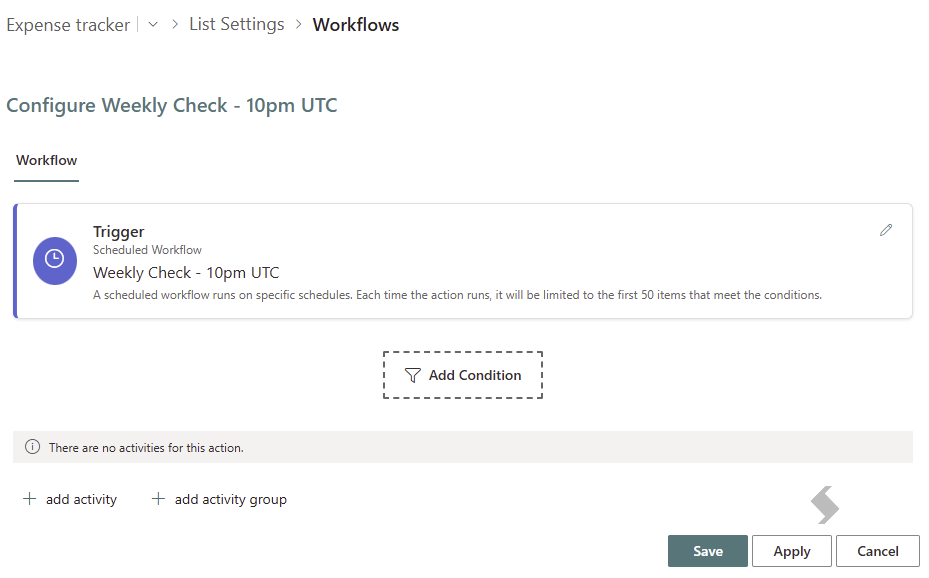

The conditions screen will pop out allowing you to choose the conditions that should be met, you do not have to provide any if they are not needed!
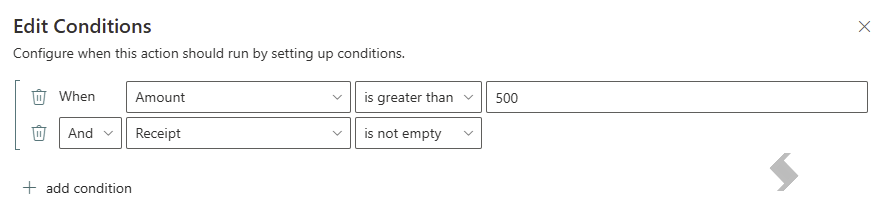

Once you save a summary will be displayed in the workflow view
Now activities or Groups of Activities can be added. When selecting + Activity you will shown a list of any existing activities.
- There is a filter that will show All or unused.
- There is a search that will allow you to limit the list
- All items will be grouped by type
- If the activity is used in another workflow this will be highlighted
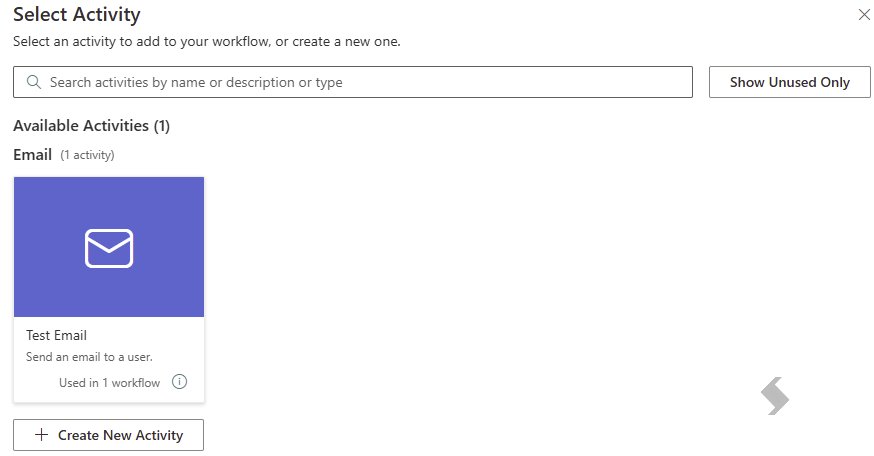

Either select the existing Activity or create a new one. This allows you to build out your workflows quickly without the need to leave this setup page.
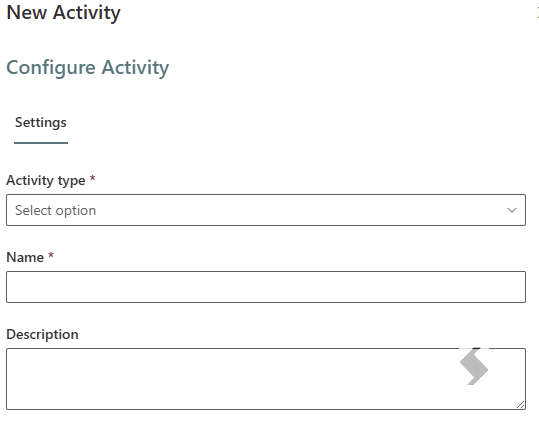

The same Activity types are available:
- Add Item
- Copy Item
- Delete Item
- Email
- Get Column Value
- Get User Group Memberships
- Get User Profile Property
- Move Item
- Set Item Permission
- Update Item
- Webservice
- Workflow

Activity Groups now support If/else options
If you need to group activities together this can be achieved with an activity group
 Once added, expand the activity using ^ or click on the item
- Then you can configure your activities and conditions (if needed)
- To use the Else options a condition must be added allowing you to choose do one group if the condition is met and an alternative if not
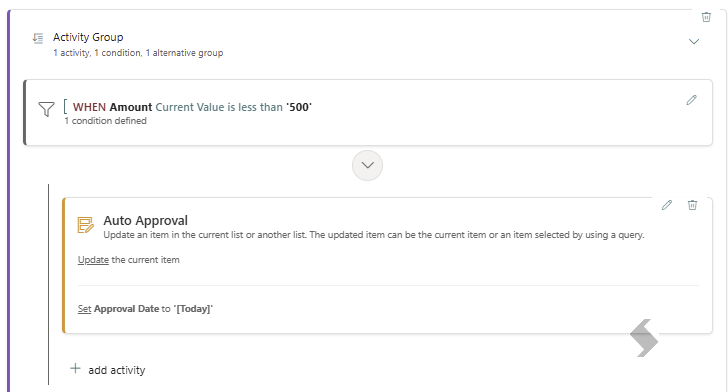
- Select the Alternative activity to set different conditions and what should happen then

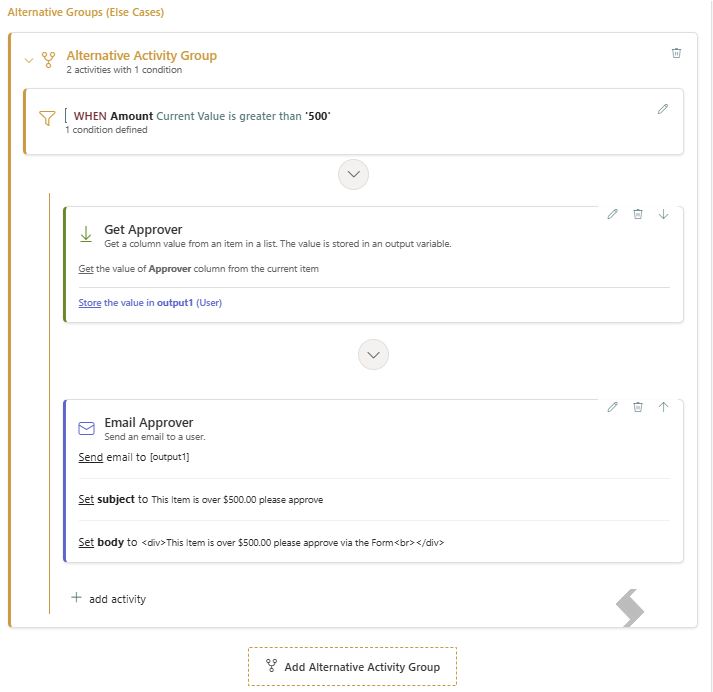

References:
Workflow & Activity Guide
How to Manage Workflows
How to Manage Activities
Expand here to see subsequent patches for v3.0
v3.0 Patch Published Mar, 13 2026 (20260307)
- 2355 – Fixed an issue where the Out-of-the-box SharePoint form did not load when opening an item using a direct link (URL) on sites where the Kwiz Modern UI package was present. The issue has been resolved to ensure the form displays correctly.
- 2356 – Fixed an issue where users could not open records directly from a list. In some cases, selecting an item resulted in a white, non-responsive screen. The issue has been resolved to ensure records open correctly.
- 2357 – Fixed an issue where the Kwiz Print functionality could get stuck at the “Retrieving Data” stage when printing a list item or form. The print process has been updated to ensure data is retrieved correctly from the SharePoint site.
Resolved issues in SharePoint On-Premises Forms apps: To apply these fixes, install the latest Foundation WSP package (attached for your convenience).
- 2358 – Fixed an issue where Email activity would not send email if the Field token value was empty. If the user token in the To or CC field is left blank, the application will automatically populate it using the upper‑level site membership. Specifically, it will select the first alphabetical group listed on the People and Groups page.
- 2359 – Improved stability and performance when running workflows.
https://catalog.kwizcom.com/sites/pc/Packages/KWizCom%20Apps%20Foundation%20Full%20Trust%201.0.153.wsp
v3.0 Patch Published Mar, 06 2026 (20260222)
This patch provides stability improvements across Forms, Print, and Modern UI, primarily addressing issues where the form rendering pipeline failed to execute after the initial load. These issues could cause blank screens, stalled form rendering, or missing functionality across multiple products.
Resolved issues:
- 2344 – Fixed an issue where form configurations could reset. When a User Triggered Workflow is set as the default action, custom form tabs and layouts are now preserved. The GetCustomActionsSettings method has been corrected to load configurations properly.
- 2348 – Fixed an issue where forms failed to load properly after the first use. Forms now open correctly every time, with the rendering pipeline fully restored for a consistent user experience.
- 2350 – Fixed an issue where published files were created even when Versioning or Draft settings were disabled. The system now respects these settings, and the Settings page logic has been updated to enforce versioning configuration correctly.
- 2351 – Fixed an issue where KWIZ Apps Settings loaded inconsistently. The page now loads reliably every time, and the form render pipeline executes correctly on each load.
- 2352 (Print) – Fixed an issue where printing could get stuck on “Retrieving Data.” Printing now completes reliably, and the render function runs correctly on every form render.
- 2353 – Fixed an issue where the Script Editor opened as a blank screen on item forms. The editor now loads reliably every time, allowing users to add or edit scripts without interruptions. This was caused by Monaco Editor dependencies being blocked by Microsoft's new Content Security Policy (CSP); they are now loaded from the apps.kwizcom.com CDN, restoring full functionality.
Resolved issues in SharePoint On-Premises Forms apps: To apply these fixes, install the latest Foundation WSP package (attached for your convenience).
- 2325 – Fixed an issue where date and time values appeared incorrect due to time zone differences. Dates and times are now displayed and processed correctly across all workflows and sites, with UTC conversion in the Token parser corrected.
- 2327 – Fixed an issue where a Scheduled Workflow continued sending emails even after it was disabled.
https://catalog.kwizcom.com/sites/pc/Packages/KWizCom%20Apps%20Foundation%20Full%20Trust%201.0.151.wsp
v3.0 Patch Published Mar, 03 2026 (20260217)
- 2321 - Resolved an issue where the Side Panel display mode was unstable and intermittently reverted to the default out-of-the-box view. The Side Panel now consistently opens as intended without affecting existing forms or workflows.
- 2322 - Improved the Forms Builder user interface by ensuring the Insert Row or Swap message disappears correctly after drag-and-drop actions.
- 2323 - Resolved a visual instability when opening New, Edit, or View item forms on Modern lists. Forms now open smoothly without impacting existing forms or data.
- 2332 - Fixed an issue where the loading placeholder displayed as a full form instead of a single line on cold start. Placeholders now display correctly without disrupting the UI.
- 2333 - Resolved an issue where the 'Total' field was not functioning correctly in Repeating Rows. Totals now calculate and display as expected without impacting existing data or configurations.
- 2338 - Improved Workflow Editor performance when working with lists that contain a large number of fields and workflow activities. The editor now loads and responds more efficiently without impacting existing forms, workflows, or activities.
- 2341 - Resolved an issue with user triggered workflow redirection. After running a workflow, users are now correctly returned to the list view instead of being redirected to the Home page.
- 2345 - Resolved an issue with View Item redirection. Opening an item in full-width mode no longer redirects to a blank page.
Version 2.1 2026 Patches
Expand to see 2026 Patches
Patch Published Feb, 24 2026 (20260217)
- 2321 - Resolved an issue where the Side Panel display mode was unstable and intermittently reverted to the default out-of-the-box view. The Side Panel now consistently opens as intended without affecting existing forms or workflows.
- 2322 - Improved the Forms Builder user interface by ensuring the Insert Row or Swap message disappears correctly after drag-and-drop actions.
- 2323 - Resolved a visual instability when opening New, Edit, or View item forms on Modern lists. Forms now open smoothly without impacting existing forms or data.
- 2332 - Fixed an issue where the loading placeholder displayed as a full form instead of a single line on cold start. Placeholders now display correctly without disrupting the UI.
- 2333 - Resolved an issue where the 'Total' field was not functioning correctly in Repeating Rows. Totals now calculate and display as expected without impacting existing data or configurations.
- 2338 - Improved Workflow Editor performance when working with lists that contain a large number of fields and workflow activities. The editor now loads and responds more efficiently without impacting existing forms, workflows, or activities.
- 2341 - Resolved an issue with user triggered workflow redirection. After running a workflow, users are now correctly returned to the list view instead of being redirected to the Home page.
Patch Published Feb, 16 2026 (20260123)
These fixes apply to SharePoint On-Premises. To apply the updates, the latest Foundation WSP package must be installed. The package is attached for your convenience.
https://catalog.kwizcom.com/sites/pc/Packages/KWizCom%20Apps%20Foundation%20Full%20Trust%201.0.149.wsp
- 2294 - (Forms On Prem) Resolved an issue where using the Author field in a workflow email action could send notifications to multiple users instead of only the single user specified. Emails are now sent correctly to the intended individual, ensuring accurate and consistent notifications.
- 2304 - Resolved an issue where scheduled workflows could not be created or opened when the site Regional Settings time zone was set to a non-round offset (for example, UTC +5:30). Scheduled workflows now load and function correctly without impacting existing forms, workflows, or activities.
- 2305 - (Forms On Prem) Resolved an issue where only one workflow could be triggered on a SharePoint list. Multiple workflows can now run independently using the same trigger, allowing all configured processes to execute correctly when an item is created or updated.
- 2314 - (Forms On Prem) Resolved an issue where Kwiz Settings were not available at the site level. Kwiz Settings are now accessible at the appropriate site levels.
- 2315 - (Forms On Prem) Resolved an issue in the Form Builder where the Cell Visibility panel was not scrollable when multiple conditions were added. Users can now scroll through all conditions and access and edit items at the bottom of the list.
- 2319 - (Forms On Prem) Resolved an issue in the Form Builder where hidden fields using the Cell Visibility feature created empty space on the page. Hidden fields now collapse properly, maintaining a clean and usable form layout while still displaying correctly when visibility conditions are met.
Patch Published Jan 24, 2026 (20260115)
- We fixed several important issues that could cause the system to behave inconsistently or become unstable. The system now runs smoother and more reliably across all tenants, with fewer errors and improved overall stability.
- 2296 - Resolved an issue where embedding a SharePoint list NewForm.aspx page via iframe in modern pages rendered the list view instead of the new item form.
- Updated SPFx packages to include new trusted script sources to ensure compatibility with upcoming SharePoint CSP enforcement. When installed, the updated packages automatically add the required script sources to the customer’s SharePoint tenant.
More details: Content Security Policy (CSP) Impact
Patch Published Jan 15, 2026 (20260111)
- 2292 - Resolved an issue where Active Directory (Security) Group lookups could fail and cause performance degradation when Microsoft Graph filter limits were exceeded.
- The Graph request is now split into multiple batched calls (maximum 15 filter conditions per request) to prevent client-side failures and eliminate fallback to the foundation server.
- Additionally, user validation has been optimized by batching EnsureUser operations via the SharePoint
$batch endpoint and by first checking the site’s SiteUsers collection before calling EnsureUser. - These changes significantly reduce unnecessary calls and improve overall loading and resolution performance.If you want, I can also provide a shorter or more technical version depending on your audience.
Patch Published Jan 12, 2026 (20251225)
- 2286 - (Forms On Prem) Resolved an issue where the Style configuration for Choice fields was not applied correctly in the New/Edit form, causing the field to display incorrectly.
New features
- 2287 - KWIZ Forms introduces a major enhancement to the Draft, Preview, and Publish experience, delivering a clearer, more intuitive UI and a robust versioned workflow. Administrators can now safely build changes in draft mode, preview them in isolation, manage version history, and publish updates with confidence, all while minimizing risk to end users and improving control over configuration lifecycle.
KWIZ Forms Draft Published