This article addresses the issues where KWIZ Apps Settings appear in the Settings menu without the KWIZ Modern Package installed, and the KWizCom folder reappears in Site Assets after deletion.
Follow the steps below to remove the KWIZ Classic Custom Action Handler from your SharePoint site:
1. Navigate to the SharePoint site
- Go to the site where you want to remove the KWIZ Classic Custom Action Handler.
2. Open the developer tools.
You can do this in either of the following ways:
- Press F12 on your keyboard, or
- Click the Settings and More (three-dot menu or gear icon) > More Tools > Developer Tools
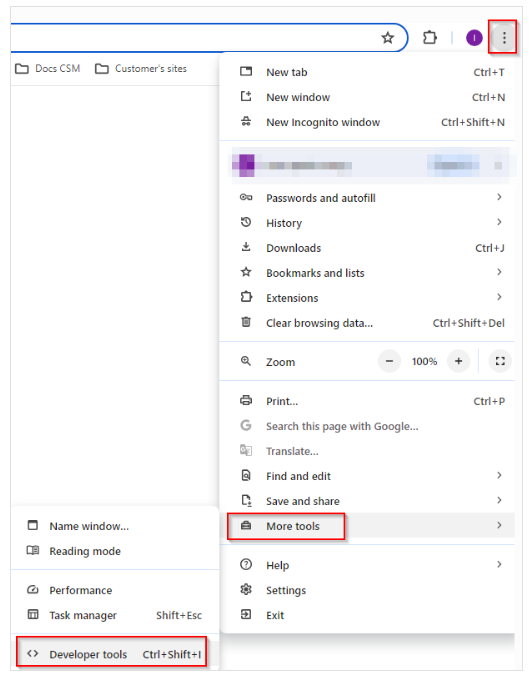
3. Go to the Console tab
- Once Developer Tools is open, click on the Console tab.
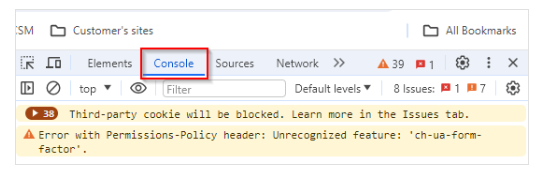
4. Paste and run the following script into the console and Click the Enter button.
If the Custom Action exists, it will be removed with message: Custom Action removed successfully. If the Custom Action doesn't exist, you will see message: Custom Action not found.
/*
1. Navigate to a SharePoint site
2. Open the developer tool byt clicking F12 or go to "Settings and More => More Tools => Developer Tools
3. Go to Console tab and paste the code below.
4. Click the Enter button.
If the Custom Action exists, it will be removed with message: Custom Action removed successfully.
If the Custom Action doesn't exist, you will see message: Custom Action not found.
*/
Code to paste:
(async function removeCustomActionByName() {
const customActionName = "kwizcom.apmodernui.classicsupport"; // Replace with the actual custom action name
const siteUrl = _spPageContextInfo.webAbsoluteUrl; // Gets the current site URL
// Function to fetch request digest
async function fetchRequestDigest() {
const response = await fetch(`${siteUrl}/_api/contextinfo`, {
method: 'POST',
headers: {
'Accept': 'application/json;odata=verbose',
'Content-Type': 'application/json;odata=verbose'
}
});
if (!response.ok) {
throw new Error('Failed to fetch __REQUESTDIGEST.');
}
const data = await response.json();
return data.d.GetContextWebInformation.FormDigestValue;
}
try {
const requestDigest = document.getElementById("__REQUESTDIGEST") ? document.getElementById("__REQUESTDIGEST").value : await fetchRequestDigest();
// Fetch the custom actions from the current site
const response = await fetch(`${siteUrl}/_api/web/usercustomactions`, {
method: 'GET',
headers: {
'Accept': 'application/json;odata=verbose',
'Content-Type': 'application/json;odata=verbose'
}
});
if (!response.ok) {
throw new Error(`HTTP error! status: $`);
}
const data = await response.json();
const customActions = data.d.results;
// Find the custom action by name
const foundAction = customActions.find(action => action.Name === customActionName);
if (foundAction) {
console.log(`Found Custom Action: $ with ID: $. Attempting to remove...`);
// If found, attempt to delete the custom action
const deleteResponse = await fetch(`${siteUrl}/_api/web/usercustomactions('$')`, {
method: 'POST',
headers: {
'Accept': 'application/json;odata=verbose',
'Content-Type': 'application/json;odata=verbose',
'X-RequestDigest': requestDigest,
'IF-MATCH': '*',
'X-HTTP-Method': 'DELETE'
}
});
if (!deleteResponse.ok) {
throw new Error(`HTTP error! status: $`);
}
console.log(`Custom Action '$' removed successfully.`);
} else {
console.log('Custom Action not found.');
}
} catch (error) {
console.error('Error:', error);
}
})();