Introduction
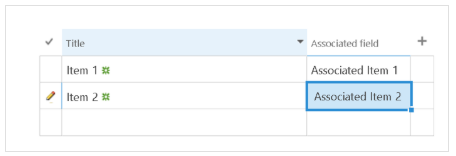
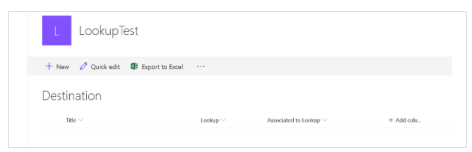
We have a Source List and a Target List. The Target List includes a Lookup field that retrieves data from a field in the Source List.
In the example below:
- The Lookup field retrieves data from the Title field in the Source List.
- The Associated to Lookup field retrieves the corresponding data from the Associated Field column in the Source List.
The goal is to configure the KWIZ Form on the Target List so that both the selected lookup value and its associated field value are automatically populated on the form
Steps to Configure the Form
- In the Target List, click New to create a new item.
- Create a new text field in the Target List where the associated field value will be displayed on the form.
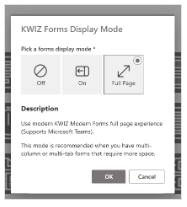
- Enable KWIZ Forms Display Mode on the Target List
- On the New Item page, click the gear icon on the right side of the page and select JS Script Editor.
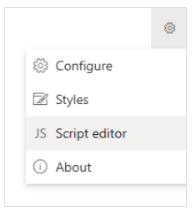
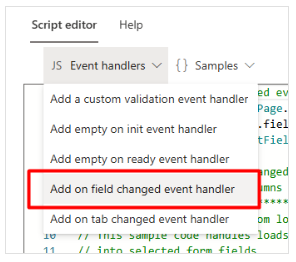
- Click Script Editor and select Add on field changed event handler.
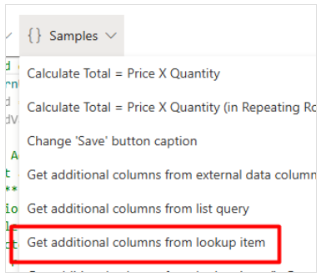
- Click Samples and choose Get additional columns from lookup item.
- Copy and paste the required code into the code section:
//#region Add on field changed event handler
kwizcom.ModernUILibrary.FormPage.OnFieldChanged("designer", function (fieldName, form) {
    if (form.context.pageType === 4) return;//only work on new/edit item form

    //=~=~ Set the lookup field, target lookup columns and fields to update here  =~=~
    var lookupFieldName = "Lookup";      // lookup field name in the current form
    var fieldsToGet = ["Associated_x0020_field_x0020_"]; // fields to get their values from the target lookup list
    var fieldsToSet = ["Associated_x0020_to_x0020_Lookup"]; // fields in the current form to set values
    //=~=~=~=~=~=~=~=~=~=~=~=~=~=~=~=~=~=~=~=~=~=~=~=~=~=~=~=~=~=~=~=~=~=~=~=~

    //by default we take the target site/list from the current context, but you can change that here.
    var targetSiteServerRelativeUrl = form.context.webUrl;//target list site relative URL.
    var listId = form.context.fieldMap[lookupFieldName].LookupList;//the lookup target list id.

    if (fieldName === lookupFieldName) {
        var val = form.GetFieldValue(lookupFieldName);
        if (val && val !== "" && val > 0) {
            form.utilities.GetListItemFieldValues(targetSiteServerRelativeUrl, listId, val, fieldsToGet).then(function (result) {
                fieldsToSet.forEach(function (field, index) {
                    var fieldToGet = fieldsToGet[index];
                    var value = fieldToGet && result ? result[fieldToGet] : null;
                    var setFieldEx = form.context.fieldMap[field];
                    if(setFieldEx && setFieldEx.TypeAsString === "Number" || setFieldEx.TypeAsString === "Currency") {
                        var valueAsNumber = Number(value);
                        value = isNaN(valueAsNumber) ? null : valueAsNumber;
                    }
                    form.SetFieldValue(field, value);
                });
            });
        }
        else {
            //lookup is empty - set to null
            fieldsToSet.forEach(function (field) {
                form.SetFieldValue(field, null);
            });
        }
    }
});
//#endregion Add on field changed event handler
Result
Once the above steps are completed, selecting a value in the Lookup field will automatically populate both:
- The selected lookup value
- The associated field value related to that lookup item on the KWIZ Form as expected.