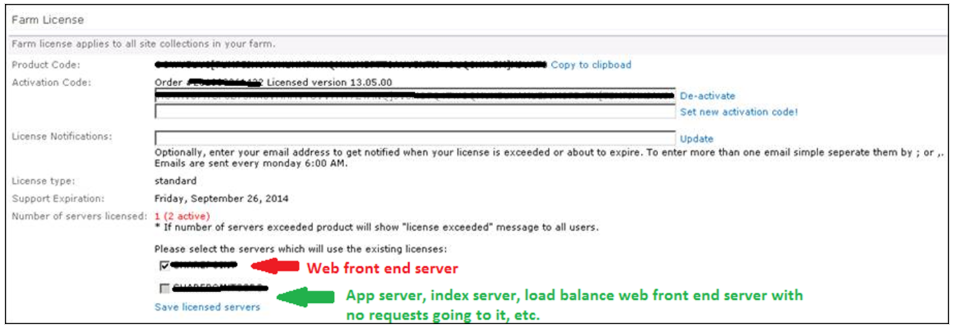
This Knowledge Base article explains how KWIZ products identify front-end servers for licensing validation in SharePoint On-Premises environments.
Understanding Front-End Server Identification
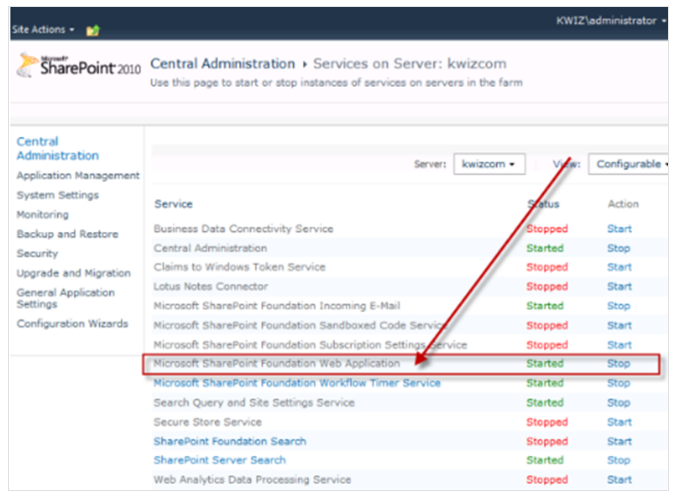
When using KWIZ products within your SharePoint environment, it is important to understand how front-end servers are identified for licensing validation purposes. The KWIZ licensing validation process relies on the presence of the "Microsoft SharePoint Foundation Web Application" service on each server.
Active Service (Status=Started): If this service is running (started) on a server, KWIZ considers it a front-end server for licensing purposes. Consequently, a valid KWIZ license is required for that server to utilize KWIZ products.
KWIZ Licensing Validation Process
After activating a KWIZ product in your SharePoint environment, a licensing validation check is triggered whenever a SharePoint page containing the KWIZ product is loaded. This validation verifies the number of front-end servers in your farm against the number of servers covered by your KWIZ license.
If the validation discovers that the number of front-end servers surpasses the limit in your license, you might encounter a KWIZ license validation error message, indicating you're exceeding the allowed server count.
Example:
Imagine you purchased a KWIZ farm license that covers two front-end servers, but your SharePoint farm actually has three. In this case, you might encounter a licensing error message when using KWIZ products. This error arises because your farm exceeds the licensed server limit. The KWIZ product may not function correctly until the licensing issue is addressed.
To avoid license validation errors, it is important to ensure that you have purchased a license that covers all front-end servers in your SharePoint farm. If you need to add additional front-end servers to your SharePoint farm, you may need to purchase additional licenses to cover those servers.