What is a Hub Site?
Microsoft's definition is:
"SharePoint hub sites help you meet the needs of your organization by connecting and organizing sites based on project, department, division, region, etc. making it easier to:
- Discover related content such as news and other site activities
- Apply common navigation, branding, and site structure across associated sites
- Search across all associated sites
SharePoint administrators determine how many hub sites can be created in your organization, who can associate sites with each hub site, and whether associating a site to a hub requires approval. "
Expand here to see more resources from Microsoft
There is useful information about Hub Sites in Microsoft Learn:
If you have existing Hub Sites setup in Microsoft, that are not managed by ProvisionPoint, import them into the app.
This will allow them to be associated to on request for new workspaces or using actions on existing items.
Creating a Hub Site
Natively in Microsoft, Hub sites can only be created by SharePoint Administrators within the SharePoint Admin Centre, once the Site is created it can be registered as a hub site.
ProvisionPoint allows the creation and registration of Hub Sites.
Creating a Service Definition that has all your Hub Sites is recommended if you want your requestors to choose from a List of available Hubs.
This is not mandatory but helps you to apply compliance checks or different lifecycle options for the Hubs.
Expand here to see the steps to create a Hub Site Service Definition
Within the Hub Sites tab of a Service Definition (except for Sub Sites) you can configure the option to register the workspaces provisioned through the Service Definition as a Hub Site.
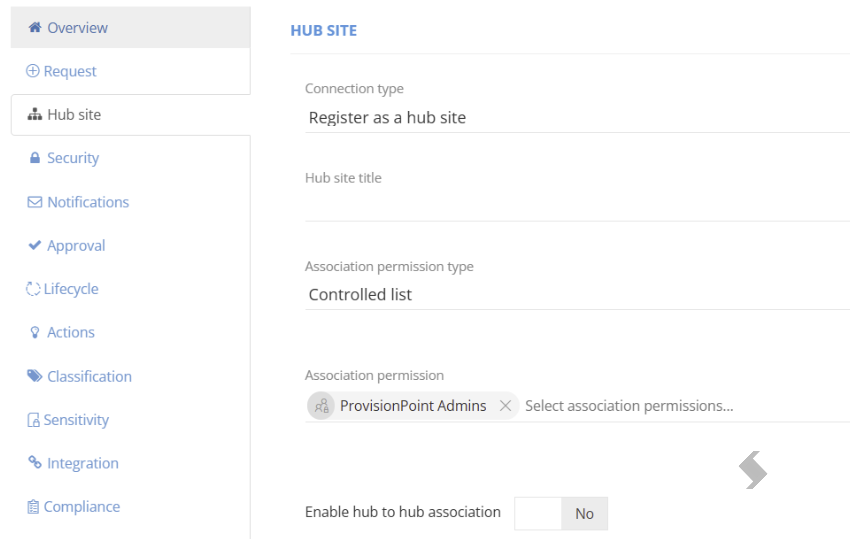
To register the workspace as a Hub Site, you will have the following things to configure:
- Connection type - set the dropdown to Register as a hub site.
- Hub site title - The user-friendly name for a Hub Site that is relevant to the users. If left blank the name of the Site will be used.
To set a default value for all created sites from this Service Definition type any text you want to apply.
This will be displayed on the SharePoint site itself, as well as in the Hub column within the SharePoint Admin centre.
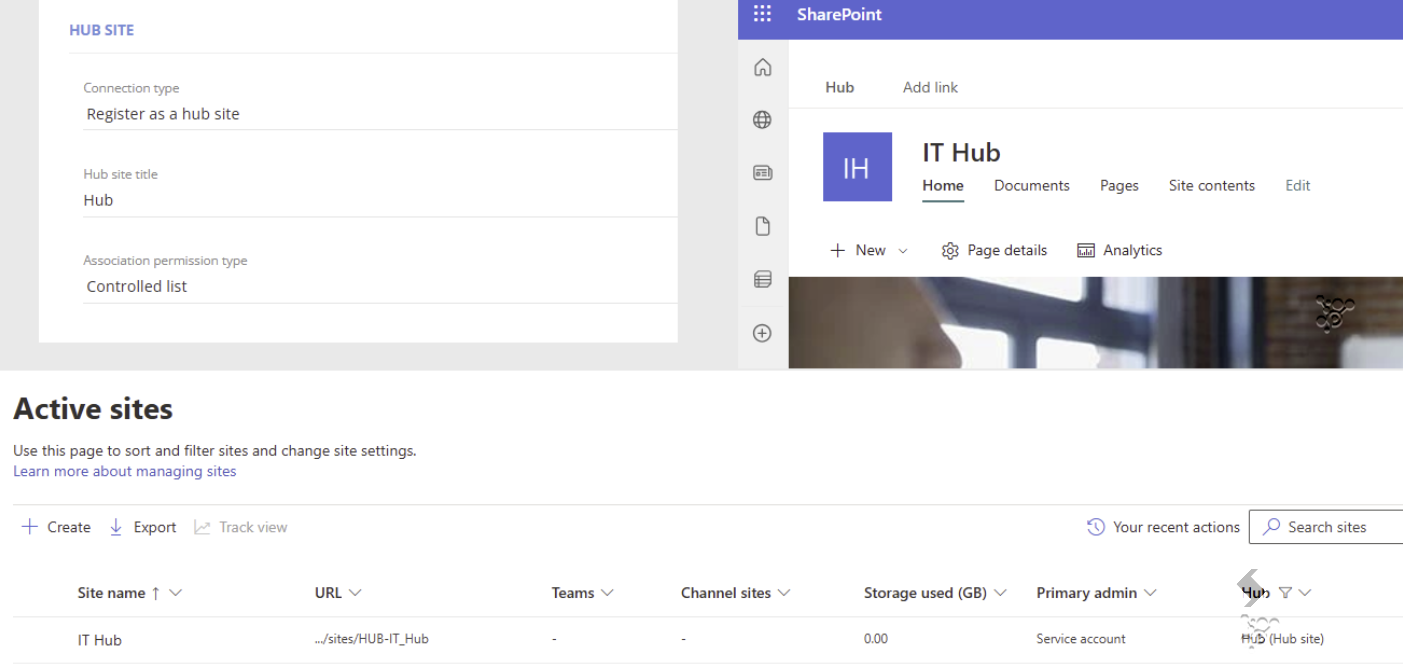
- Association Permission type - Hub site association permissions allow specified users or groups to associate a site with the Hub site.
Use this to restrict who can associate items to Hubs. - Save the Service Definition.
When you next request a workspace through this Service Definition, this will be registered as a Hub Site. On the View Details page for the Service Instance, this will be listed as a Hub site.
You can import existing hub Sites that are not currently managed into ProvisionPoint.
When using our import examples you will need to use Import level 1 or 2, then run the action 'Register as a Hub Site' to ensure they are picked up correctly in your setup.
This may be needed before you full setup the Parent Hubs.
You can also transfer existing Hubs using the API to the newly created service definition to group all hub sites together.
A new Action has been added allowing Owners or permissioned users to register existing sites as a Hub site.
There is also the option to enable and configure hub to hub association.
Enabling this allows you to set the parent Hub for this workspace, while also registering it as a Hub site.
The parent Hub must already exist in ProvisionPoint and be registered as a Hub Site to work.
If it already exist, use the 'Register as a Hub' action
Expand here to see the steps to configure the Hub to Hub
1. toggle the Enable hub to hub association to Yes. Additional form fields will then appear for you to be able to configure.
- Hub site label - the user friendly name for the Hub site. This will appear only in ProvisionPoint, on the request form (if configured) and the 'View Details' page for the Service Instance
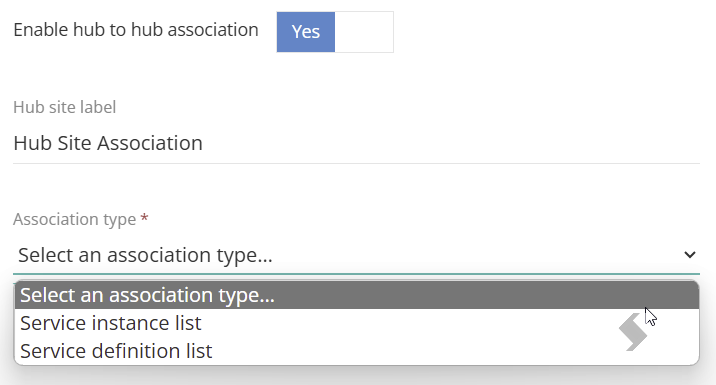
- Association type - select between:
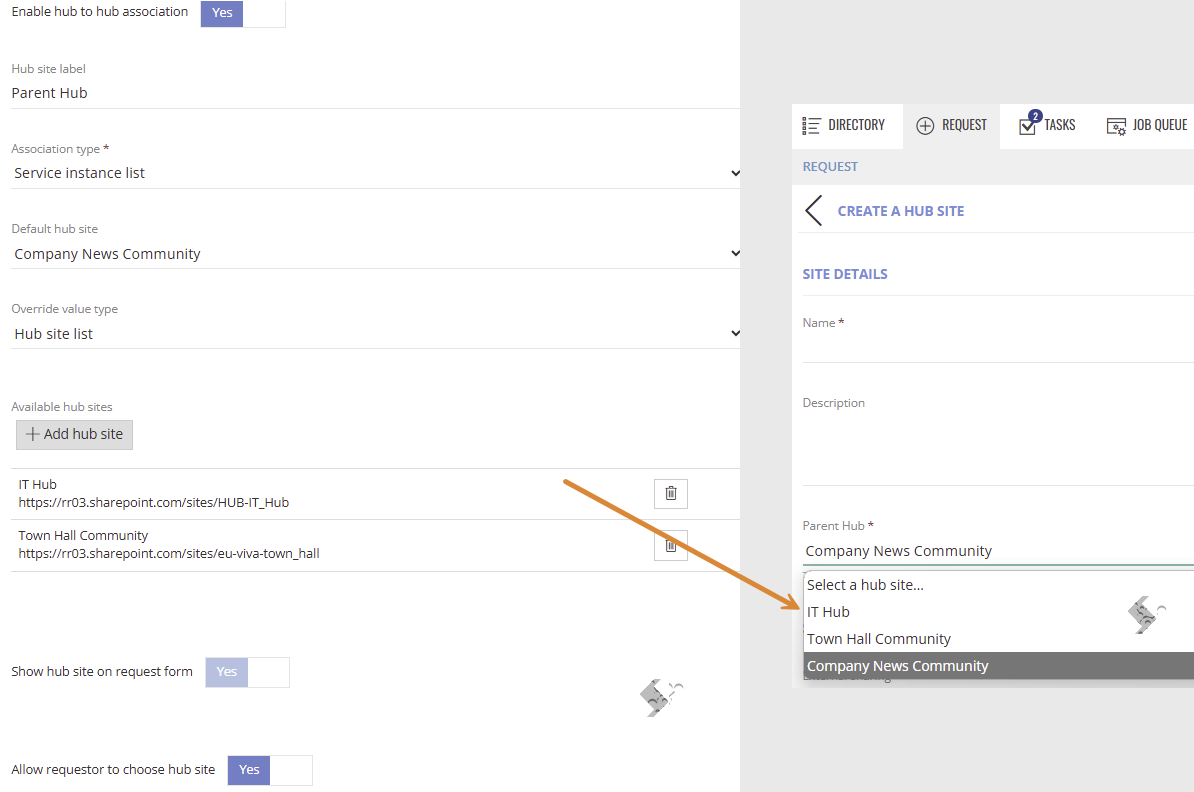
- Service instance list - if selected, this will allow you to add/select Service instances that have been created within ProvisionPoint, that are registered as a Hub site.
- Default Hub Site - set the same Parent hub for all creations
- Override value type - allow requestors to choose the Parent hub on the request form
- Click +Add hub site to select any others the requestor will be able to choose between
You'll then also see the option to allow the Requestor to choose the associated parent Hub Site, and will be able to select from available Hub Sites which the Requestor will be able to choose from
If selected, the 'Show hub site on request form' will default to Yes & you must allow the requestor to choose
- Service definition list - if selected, this will display a list of Service Definitions that have been configured to be registered as a Hub site.
- Set the Available service definitions that are configured to create hub sites to yes, these will be shown on the request form, allowing you to choose the Parent Hub
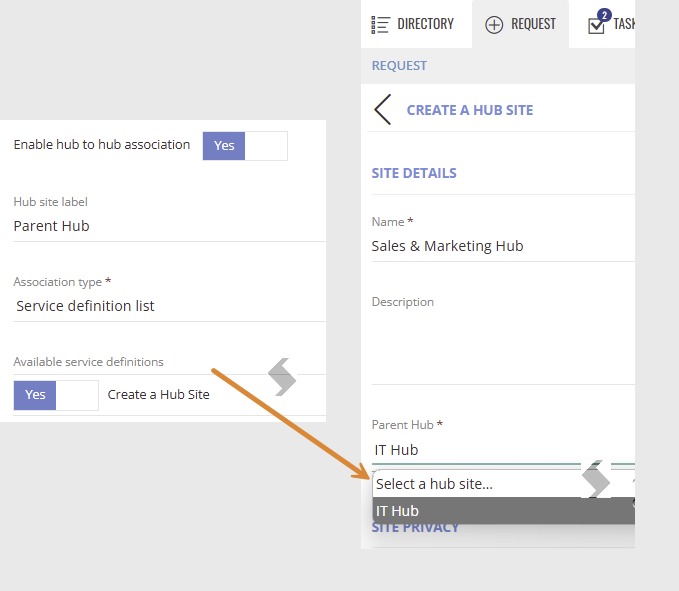
This will automatically allow requestors to choose from any hub sites linked to the Service Definition
In this example there is only 1 other hub the requestor can choose from as there is one workspace associated to the 'Create a Hub Site' service definition
You can import existing Hubs into ProvisionPoint in the same way you would for other workspaces.
- Save the Service Definition to keep all changes
Info (View Details) Page
When a workspace is associated to a Hub the info page will display
- The Hub site title - set for the Registered Hub
- The Hub site label for hub to hub association - Default is Hub Site, unless changed to something else (for example, 'Parent Site')
- The Hub Site URL of any associated or parent hubs
Once your Hub sites have been created or imported and flagged as a Hub Site, you can create Sites and link them to an existing Hub Site using the associate to Hub Site options.
There are two options:
1. Hard code the default Hub that will set on all requests
2. Allow the requestor to choose the Hub Site to associate to. You can restrict the list of options available.
Expand here to see the steps to associate to a Hub Site
Go to your Service Definition and click on the Hub Site tab.
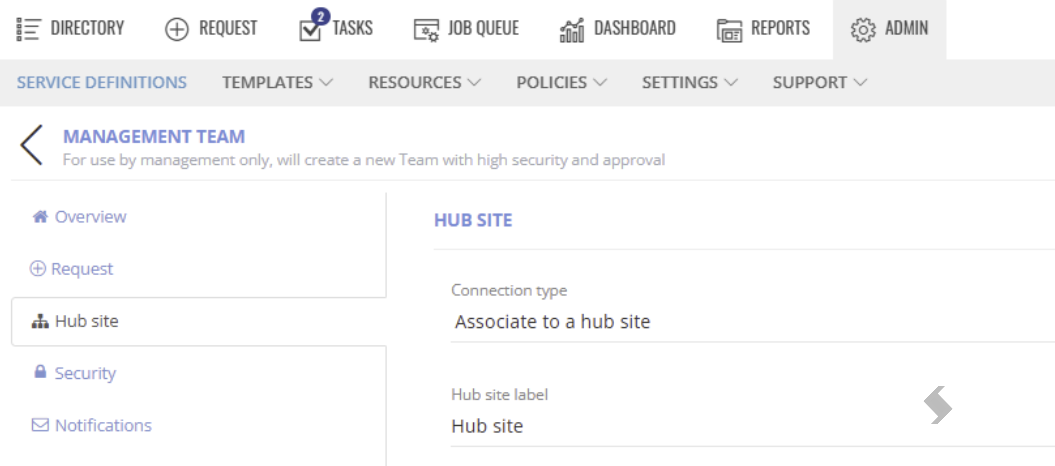
- Set the Connection type to Associate to hub site.
- Hub site label - the user friendly name. If left blank it will default to Hub site, but this can be overridden with any text of your choosing, for example, 'Associated Hub Site'
This will appear only in ProvisionPoint, on the request form and on the 'View Details/Info' page for the Service instance. - Association type - this can be set to one of two options:
- Service instance list - if selected, this will allow you to add/select Service instances that have been created within ProvisionPoint, that are registered as a Hub site.
- Default hub site - set the same hub for all creations - choose from any hubs that already exist
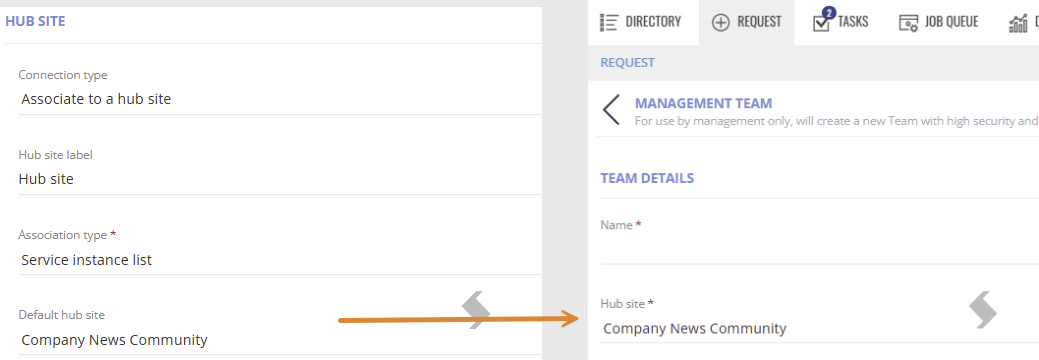
- Override value type - Select other sites that can be selected instead of the default to give the requestor the choice at the point of request.
- Click +Add hub site to choose any workspaces that have been set as a hub site
- Show hub site on request form - toggle this to Yes or No to determine whether the associated Hub Site will display on the request form. If choosing an override value, this will default to Yes
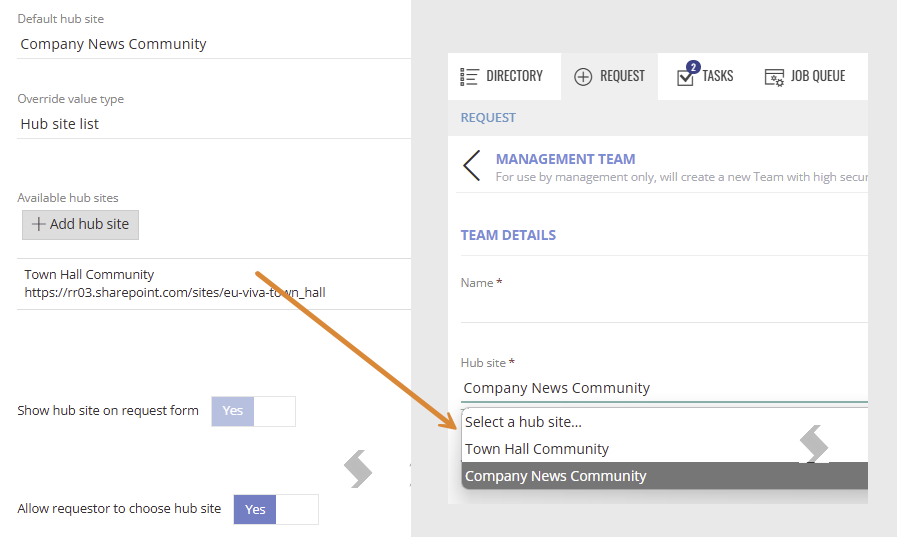
- Service Definition list - if selected, this will display a list of Service Definitions that have been configured to be registered as a Hub site.
- Set the Available service definitions that are configured to create hub sites to yes, these will be shown on the request form
This will automatically allow requestors to choose from any hub sites linked to the Service Definition
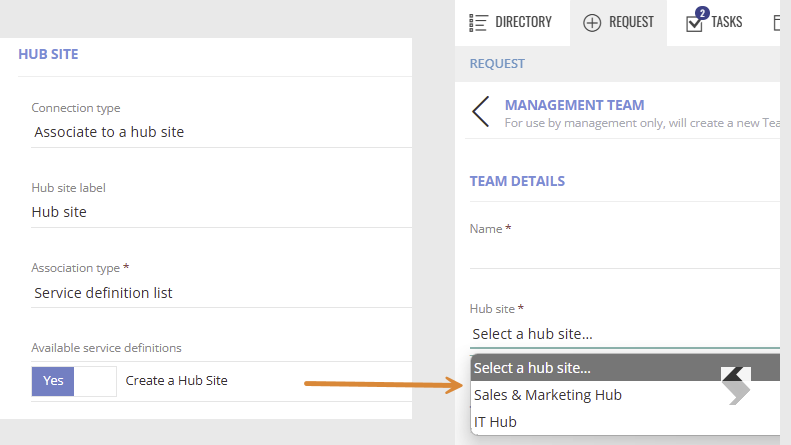
Go to the Hub Site tab in your service definition,
There can be a delay of up to 24 hours before the link to the hub is displayed in SharePoint
In the image above IT Projects has been associated to the IT Admins Hub Site, it therefor shows the shared navigation and theme of the IT Admins Site.
Info (View Details) Page
When a workspace is associated to a Hub the info page will display
- The Hub site label - Default is Hub Site, unless changed to something else (for example, 'Associated Hub Site')
- The Hub Site URL
Associate to Hub Site Action
A new Action has been added allowing Owners or permissioned users to associate existing sites to a Hub site.