Why does the SharePoint site still exists after Group deletion
When the Delete Group or Delete Team actions are run from actions or lifecycle actions, we use Microsoft Graph to send the Group deletion request.
Microsoft will then process the background tasks to ensure the Team, Site, Notebook are deleted.
Below we explain a bit more about why this happens.
Deleting a Microsoft 365 Group (via Graph or otherwise) does not instantly remove the SharePoint site.
- The group is soft-deleted first (moves to “Deleted groups” for 30 days)
- Teams disappears almost immediately
- The SharePoint site is decoupled and queued for deletion, not instantly removed
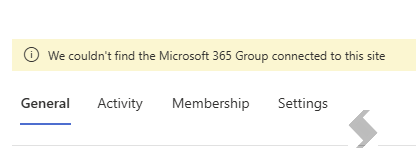
During this window:
- The site can still exist
- Permissions may still allow access (especially for Site Collection Admins)
2. SharePoint has its own deletion lifecycle
SharePoint Online manages sites independently:
👉 This creates a gap where the group is gone but the site is still active
For Teams-connected sites the site contains:
- Files (Documents library used by Teams)
- Channel folder structure
- Possibly private/shared channel sites
Because of this, deletion:
- Is queued
- Goes through dependency checks
- Private and Shared Channel Sites must also be cleaned up, this will delay the parent site cleanup.
3. Permissions can persist
Even if the group is deleted:
- Users who had direct permissions or were site admins may still have access
- The site isn’t immediately locked down
4. Background provisioning / deprovisioning delays
Microsoft 365 uses asynchronous backend jobs:
-
Group deletion triggers:
- Exchange cleanup
- SharePoint cleanup
- Teams cleanup (if applicable)
These processes can take minutes to hours to days (sometimes longer)
5. If retention policies were present (even if you think not)
Even if you believe no retention is applied, check carefully:
- Microsoft Purview retention policies
- Retention labels applied to content
- eDiscovery holds
👉 If any of these exist:
- The site will be preserved
- It may remain accessible or partially accessible
6. Orphaned site scenario
Sometimes the group is deleted but site deletion fails or is delayed, creating an orphaned SharePoint site.
This can happen due to:
- API-driven deletions via Graph
- Temporary service issues
- Dependency failures (e.g., Teams-linked site)
What can you do?
- Wait, it is most likely going through the scenarios above and will need time to be processed.
- Manually remove the Site.
Check for Orphaned Sites
You can use PowerShell to look for orphaned Sites
If there is an empty GroupId or it shows as null, it is orphaned. Next if it is Teams Group, check for channel sites:
-
Get-SPOSite | Where-Object {$_.RelatedGroupId -eq "<old group id>"}
To remove the Sites Manually, your SharePoint Admins can do this via the SharePoint Admin Centre or using PowerShell
- Soft Delete
Remove-SPOSite -Identity
-