Overview
This guide shows how to add custom JavaScript to a Modern UI form using the Script Editor, enabling you to control buttons like Save, Apply, and Cancel.
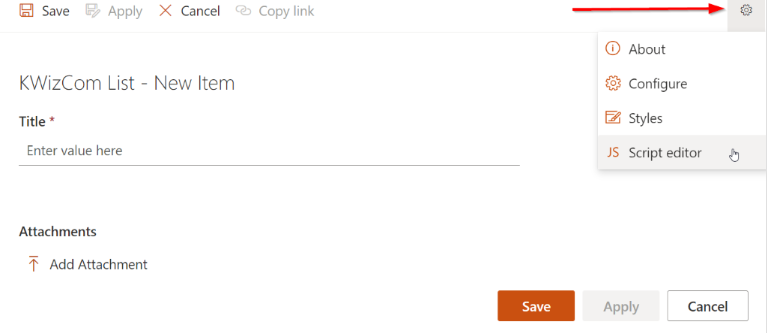
In order to add the script, accessing the Script Editor.
- Open one of the list items in view/edit form.
- Click the gear icon on the top-right side of the form and select Script editor.
Script Implementation
-
Add an OnReady handler – ensures the script runs when the form loads:
//#region On form ready
kwizcom.ModernUILibrary.FormPage.OnReady("SetButtonState", function (form) {
    setButtonState(form, "");
});
//#endregion
-
Add an OnFieldChanged handler – updates button state whenever the checkbox is modified:
//#region On field changed
kwizcom.ModernUILibrary.FormPage.OnFieldChanged("SetButtonState", function (fieldName, form) {
    setButtonState(form, fieldName);
});
//#endregion
-
Define the setButtonState function:
function setButtonState(form, fieldName) {
    var yesNoFieldInternalName = "I_x0020_confirm_x0020_that_x0020"; // Replace with your checkbox internal name

    if (form.context.pageType === 4) return; // Skip if in Display mode

    if (form.context.containerId === "Main" && (fieldName === yesNoFieldInternalName || fieldName === "")) {

        // Get toolbar buttons
        let applyButton = document.querySelector("button:has([data-icon-name='SaveAs'])");
        let saveButton = document.querySelector("button:has([data-icon-name='Save'])");
        let saveButtonLabel = document.querySelector("button:has([data-icon-name='Save']) .ms-Button-label");

        // Get checkbox value
        let isChecked = form.GetFieldValue(yesNoFieldInternalName);

        // Hide Apply button
        applyButton && (applyButton.style.display = "none");

        // Rename Save button to Submit
        saveButtonLabel && (saveButtonLabel.innerHTML = "Submit");

        // Enable/disable Save button based on checkbox
        saveButton && (saveButton.disabled = !isChecked);

        // Optional: update form button state for consistency
        form.SetButtonState({
            apply: { hidden: true },
            save: {
                text: "Submit",
                disabled: !isChecked
            }
        });
    }
}
How It Works
- The script hides the Apply button and renames the Save button dynamically.
- The Save/Submit button remains disabled until the specified checkbox is checked.
- Updates are applied both on form load and checkbox change.
Important Notes
- Replace
I_x0020_confirm_x0020_that_x0020 with the actual internal name of your checkbox field. - This solution works for Modern UI forms.
- Ensure the script runs in the Script Editor or your global JS injection for the site.