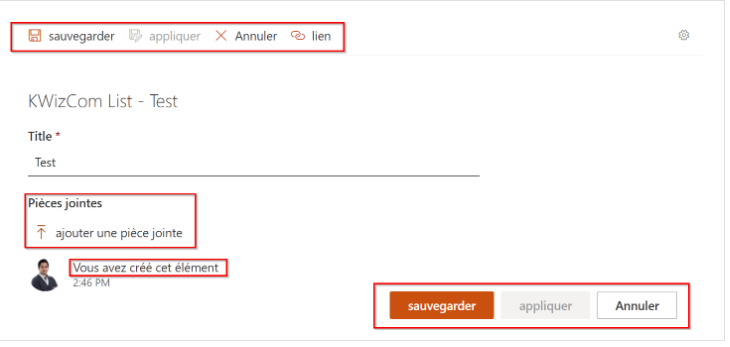
Please follow this article if you would like to translate text from English to another language. In this example the text will be translated from English to French.
If you’d like to translate button labels, placeholder text, and form messages in KWIZ Modern Forms from English to your preferred language, follow the steps below.
- Access the Script Editor. Open a list item in either view or edit mode.
Click the gear icon at the top-right corner of the form, then select Script editor.
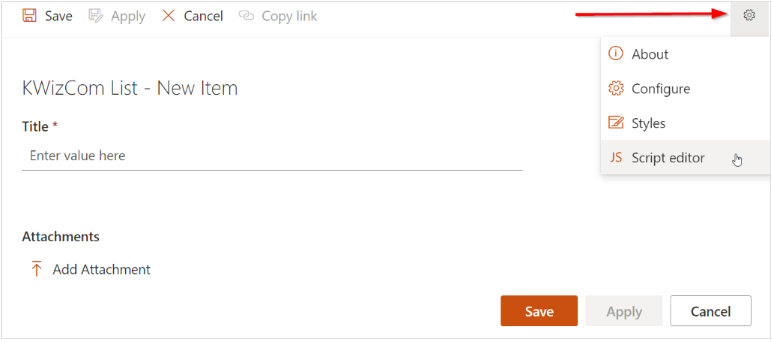
2. Copy and paste the following JavaScript code into the Script Editor section.
You can customize the text mappings based on the language you need. In the example below, the button captions are translated into French.
Expand to see the code to copy
// Replace texts to translate
kwizcom.placeholderTexts = {
    // Text to find: Text to replace
    "Pièces jointes": "Ajouter une pièce jointe",
    "Enter value here":  "Entrez la valeur ici",
    "Select option": "Sélectionnez une option",
    "Enter a date": "Entrez une date",
    "Enter a name or email address": "Entrez un nom ou une adresse e-mail",
    "Alternative text": "Texte alternatif",
    "Enter a URL": "Entrez une URL"
}
kwizcom.buttonsTexts = {
    // Text to find: Text to replace
    "Save": "Sauvegarder",
    "SaveAs":  "Appliquer",
    "Cancel": "Annuler",
    "Link": "Lien",
}

kwizcom.formTexts = {
    // Text to find: Text to replace
    "Attachments": "Pièces jointes",
    "Add attachment":  "Ajouter une pièce jointe",
    "New Item":  "Nouvel Élément",
    "You made edits":  "Vous avez apporté des modifications",
    "You created this item":  "Vous avez créé cet élément",
    "made edits":  "apporté des modifications",
    "created this item":  "a créé cet article",
}

kwizcom.ModernUILibrary.FormPage.OnReady("translateText", function (form) {
debugger;
    replacePlaceholders();
    replaceButtonsText(form)
    replaceFormTexts();

});
//#endregion Add empty on ready event handler


replacePlaceholders = function (){
    for(var oldPlaceJolder in kwizcom.placeholderTexts) {
        var newPlaceholder = kwizcom.placeholderTexts[oldPlaceJolder];
        document.querySelectorAll('*[placeholder="' + oldPlaceJolder + '"]').forEach(function(el) {
            el.placeholder = newPlaceholder;
        });
        document.querySelectorAll('span[class^="readOnlyPlaceholder"]').forEach(function(el) {
            if(el.innerHTML ===  oldPlaceJolder){
                el.innerHTML = newPlaceholder;
            }
        });
    }
}

replaceButtonsText = function(form){
    for(var button in kwizcom.buttonsTexts) {
        var but = document.querySelector("[data-icon-name='" + button + "']")
        if(but){
            but.parentNode.querySelector("span[class*='ms-Button-label']").innerHTML = kwizcom.buttonsTexts[button];
        }
    }
    form.SetButtonState({
        save: { text: kwizcom.buttonsTexts["Save"]},
        apply: { text: kwizcom.buttonsTexts["SaveAs"]},
        close: { text: kwizcom.buttonsTexts["Cancel"] }
    });
}

replaceFormTexts = function(labelText,  addAttachmentText){
    var attachmentLabel = document.querySelector('label[for^="AttachmentsFieldControl"]');
    if(attachmentLabel){
        attachmentLabel.innerHTML = kwizcom.formTexts["Attachments"];
    }

    var attachemntButton = document.querySelector("span:has([data-icon-name='Upload'])");
    if(attachemntButton){
        var addAttachmentLabel = attachemntButton.querySelector(".ms-Button-label");
        if(addAttachmentLabel){
            addAttachmentLabel.innerHTML = kwizcom.formTexts["Add attachment"];
        }
    }

    var newItemLabel = document.querySelector("label[class*='kw-formTitle']");
    if(newItemLabel){
        newItemLabel.innerHTML = newItemLabel.innerHTML.replace("New Item", kwizcom.formTexts["New Item"]);
    }

    for(var personaText in kwizcom.formTexts) {
        document.querySelectorAll("div.ms-Persona-details").forEach(function(el) {
            el.innerHTML = el.innerHTML.replace(personaText, kwizcom.formTexts[personaText]);
        });
    }
}


//#region Change 'Save' button caption
//*****************************************************************
// Change 'Save' button caption
//*****************************************************************

kwizcom.ModernUILibrary.FormPage.OnReady("change-button-caption", function (form) {
   if (form.context.pageType === 4) return;//only work on new/edit item form
   document.querySelector("[data-icon-name='Save']").parentNode.querySelector("span[class*='ms-Button-label']").innerHTML = "sauvegarder";
   document.querySelector("[data-icon-name='SaveAs']").parentNode.querySelector("span[class*='ms-Button-label']").innerHTML = "appliquer";
   document.querySelector("[data-icon-name='Cancel']").parentNode.querySelector("span[class*='ms-Button-label']").innerHTML = "Annuler";
   document.querySelector("[data-icon-name='Link']").parentNode.querySelector("span[class*='ms-Button-label']").innerHTML = "lien";
   form.SetButtonState({
     save: { text: "sauvegarder" },
     apply: { text: "appliquer" },
     close: { text: "Annuler" }
    });
   document.querySelector("label[class*='kw-formTitle']").innerHTML = document.querySelector("label[class*='kw-formTitle']").innerHTML.replace("New Item", "nouvel élément");
   document.querySelector("label[for^='AttachmentsFieldControl']").innerHTML = "Pièces jointes";
   document.querySelector("div[title='Add Attachment']").querySelector("div[class*='ms-Button-label']").innerHTML = "ajouter une pièce jointe";
   document.querySelector("div.ms-Persona").querySelectorAll("div").forEach((function(x){if(x.innerHTML == "You created this item") x.innerHTML = "Vous avez créé cet élément";}));
});
//#endregion Change 'Save' button caption
Use Case Example:
I would like to change the top and bottom button captions from English to French.
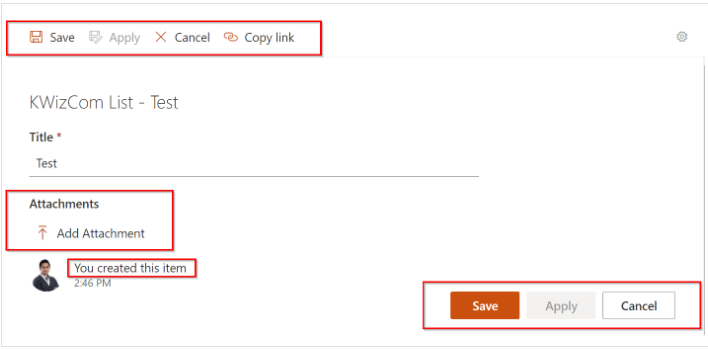
Using the above script, you will notice that it successfully updates the button caption text, changing it from English to French for both the top and bottom buttons.