Approvals can be applied to new requests or Actions to make changes to existing workspaces.
A task will be assigned to a person or Group of people. If the person or group can no longer log in or access the approval, the task can be reassigned to another user or group using the ProvisionPoint API.
This article will guide you through a change process using a PowerShell script that calls the API.
Change Approver
To complete a change of approver, there are 2 steps to our API: (For ease these have been separated in our examples)
- Get a list of all pending Approvals.
- Update the approval person or Group.
You cannot change the approval type, if it is set to a Group it must be changed to a Group.
Approval API Endpoints
The endpoint will need to have the base URL, this is the API endpoint for the ProvisionPoint instance you use
UK - https://api.provisionpoint.com/v1.0
EU - https://009api.eu-pp365.app/v1.0
CH - https://016api.ch-pp365.app/v1.0
US - https://006api.us-pp365.app/v1.0
AU - https://011api.au-pp365.app/v1.0
|
Call
| Endpoint | Method | Additional Information |
|
Get Pending Approvals
|
- /execution/awaiting-approval
- /execution/[operationId]/approval
| GET |
- OperationId of the job is required
- Collect the task & assignment details
- Id
- assigned
- assignment
- Id
- assigned
- groupName
- user.upn
|
|
Change Approver
|
- /execution/[operationId]/approval/tasks/[TaskId]/assignments/[assignmentId]
| PUT |
- OperationId of the job
- TaskID of the approval item
- Body
- Id (assignment)
- Groupname - group that will be assignmed approval
- username - who will be the new approver
|
Get a List of all Pending Approvals
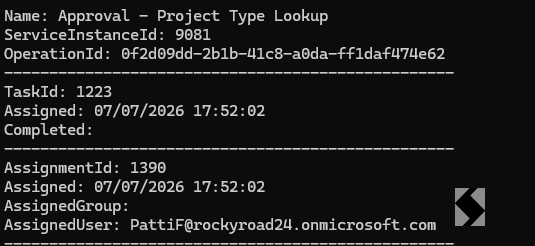
Run the script named step 1, to extract all pending approvals.
Collect/copy the
- OperationId
- Task Id
- AssignmentId
Update the Approval task
- Edit the 'Step 2' script example
- Add the Id's collected from step 1's results
- Add either the Groupname or the Username for the user
$OperationId = '0f2d09dd-2b1b-41c8-a0da-ff1daf474e62'
$TaskId = '1223'
$AssignmentId = '1390'
$url = "$global:apiUrl/execution/$OperationId/approval/tasks/$TaskId/assignments"
##

$UpdateAssignment = @{
    id = $AssignmentId
    #groupName = "My Group Name"
    userName = "leeg@mytenant.com"
}
$UpdateResponse = Invoke-RestMethod -Method Put -Uri "$url/$AssignmentId" -Body (Get-PPJsonBody $UpdateAssignment) -Headers (Get-PPHeaders $DelegatedRequestorUpn) -ContentType 'application/json; charset=utf-8'
$UpdateResponse

Start-Sleep -Seconds 3.5
$urlcheck = "$global:apiUrl/execution/$OperationId/approval"

$UpdateResponse = Invoke-RestMethod -Method Get -Uri "$urlcheck" -Body (Get-PPJsonBody $UpdateAssignment) -Headers (Get-PPHeaders $DelegatedRequestorUpn) -ContentType 'application/json; charset=utf-8'
$UpdateResponse
- Run the Script
- Check the approver in the app has updated
- Rerun step 1 or view the Reports > Content > Approvals Report

Your approval task will now be reassigned so it can be rejected or approved by the new approver(s) in ProvisionPoint.