Classification Labels are now replaced with Sensitivity Labels, we recommend migrating to these to ensure future support.
What are Classification Labels?
A label that can be applied to a Site, Group or Team to help with eDiscovery.
How they can be used in ProvisionPoint
Classification labels can be used as part of your naming conventions or as tags on your Site and Teams.
Use ProvisionPoint to define new Classification Labels or manage any existing labels you have without the need for PowerShell scripts.
Manage Classifications
You will need to be an
App Manager to create the labels, once created they can be used in Service Definitions.
- Go to Admin > Settings > Group Settings
- Toggle 'Enable Classifications' to Yes, any existing Classification Labels will be shown
- Click +New Classification
- Add the name to 'Value' as you want it to appear
- Add a description of the label
- Set one of the values as the default
- Click Done
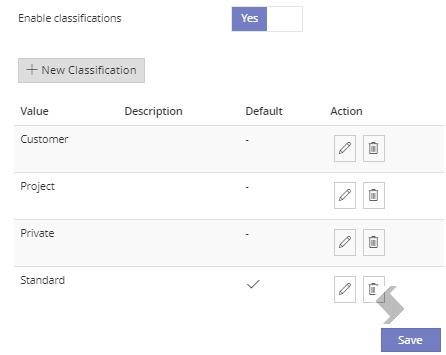
- Click Save
The Classifications Labels can be deleted using the bin icon, this will be reflected in your Azure AD tenant.
Use Classifications in Requests
Now choose how the Classifications will be used in your Service Definitions, this can be completed by App Managers or Service Definition Managers.
This can be used to give your request a choice of classifications or to restrict them per Service Definition.
- Go to Admin > Service Definitions > Classification
- The Classification label shown on the request form can be changed if required. By default, it will be Classification
- Toggle 'Use a service definition specific default classification' to Yes
- Select the default classification that will appear on the request form
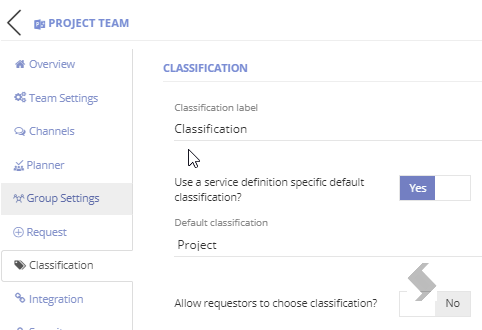
- Decide if the requestors can change the Classification and define which can be chosen
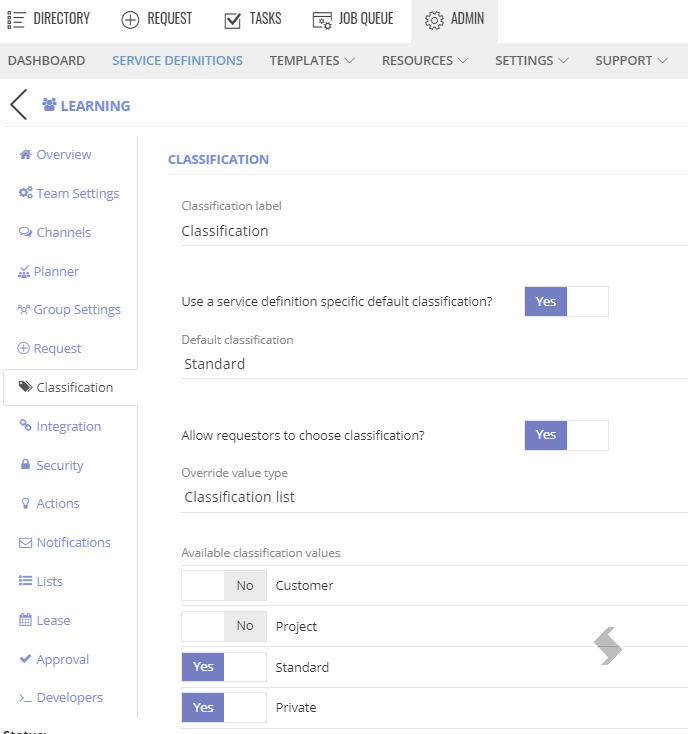
- Save your Service Definition
When a request is made your set-up will be reflected in the request form and then on your workspace. You can also use the {Classifications} tag to apply the label results to a naming convention or to a notification or within a PnP template or Power Automate Flow.
The result in Microsoft will show the Label