Yes, providing you have Guest Access enabled in your Service Definitions and workspace.
Use the 'Add Guest User' action to invite guests to the workspace after it has been created.
For Group based workspaces, guests can be added, if External Sharing allows new guests and guest access is enabled
- Open the Service Definition linked to any workspaces that will allow guests to be accessed
- Go to the 'Security' tab and the Add Guest User Action section
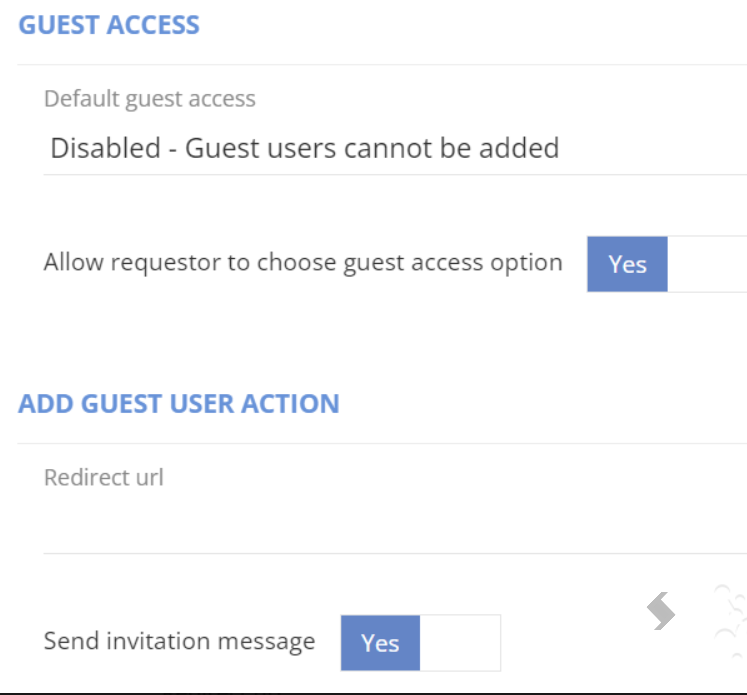
- The 'Redirect url' is what your guest will be sent to once they accept the invitation. If left blank this will go to the Site Url.
This can be set to any other web addresses you prefer for example, {TeamUrl} - 'Send invitation message' can be disabled, in this case the actions post web hook can be used as part of an automation you configure.
- Go to the Actions tab to enable the action and configure approvals, notifications, permissions or web hooks
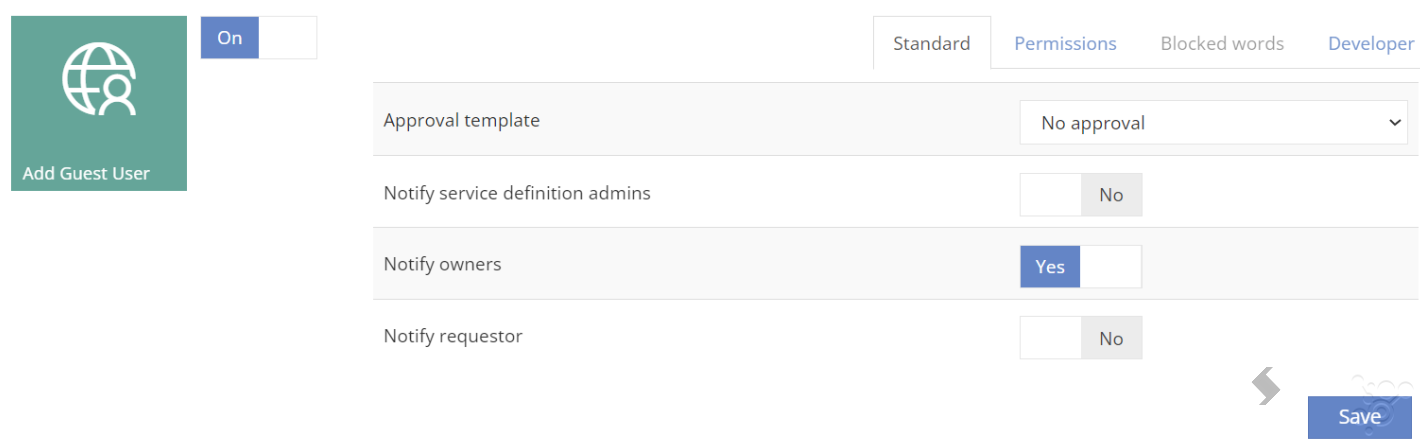
- Save the Service Definition
Once a workspace is created the Action can be run to add the guest, and invite them to your tenant.
The timeline in ProvisionPoint will show the Add guest user action has been run and its status.
The Display name will be shown in Azure as the name you add here, once the invite is accepted this will match the name displayed in the guests tenant.