When a creation task fails, it will pause at the point of failure, this may be before or after the initial Team is created.
For example, if the failure occurred adding a Private Channel, the Team would be created but the Private Channel would not. If the SharePoint List in Integration failed, everything would be created but the List would not be updated.
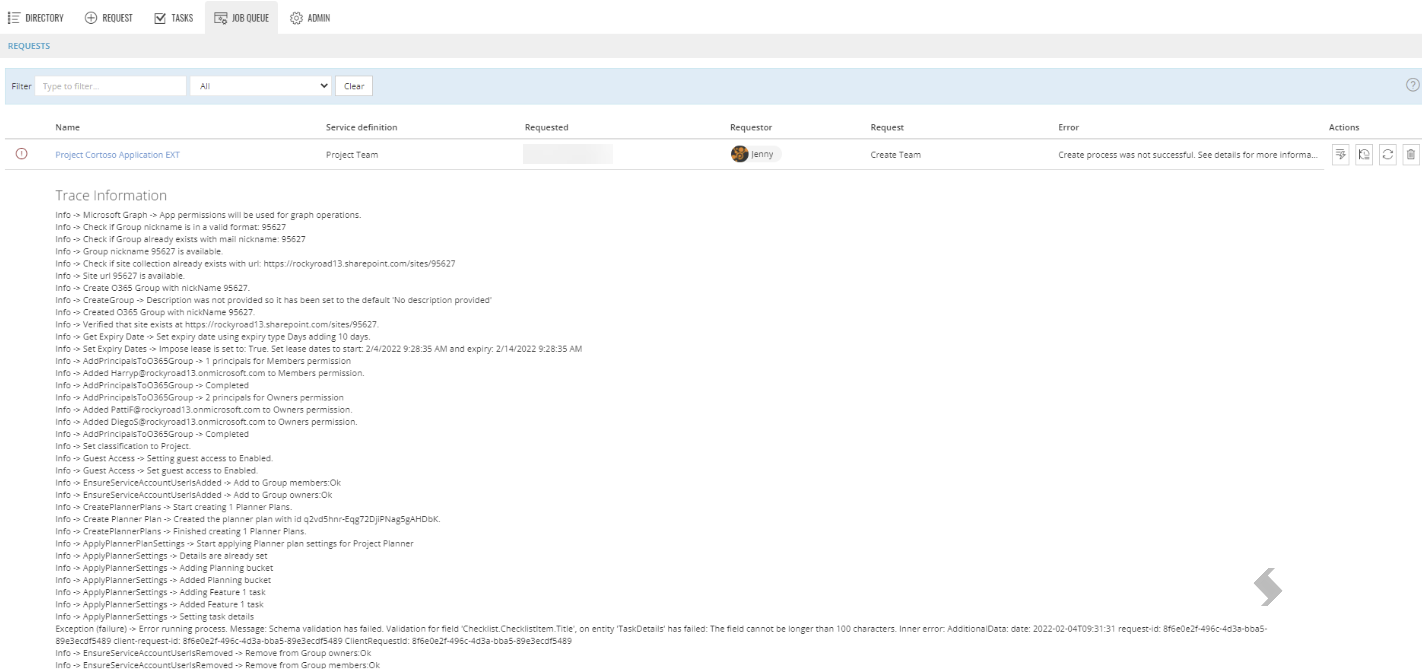
The pause is done on purpose, to allow your admins time to troubleshoot the issue using the Job Queue. The 'Trace Log' can be accessed via the Job Queue and will show all the steps that have been completed and highlight errors. Once the issue is resolved, the job can be replayed to continue the provisioning.
Example 1: The naming of the Team could not be created, a transform tag was not available, {IDS}. We can see that nothing has been created at this stage.
A replay will not be possible and the request should be deleted from the Job Queue.
Example 2: There has been an issue when creating a planner, the task checklist has more characters than is supported by Microsoft. We can see in this trace that the Group has been created and the Planner Plan, this will be reflected in the tenant.
This request Must be fixed and replayed to ensure it completes successfully for all ProvisionPoint features to work.
If it is deleted the Microsoft elements will remain, but ProvisionPoint will not retain the information.