After your Compliance Policy is configured and has been running an update or change to the Policy may be required. The guidance below will advise the best practice method to change the Policy, Rules or Rules.
Replace the Policy
Use this method if the existing policy needs to stay as it is, as it will affect other Service Definitions.
Edit an Existing Policy
Use this method if changes need to be applied to all Service Definitions linked to this policy.
- Go to Admin > Policies > Compliance Policies
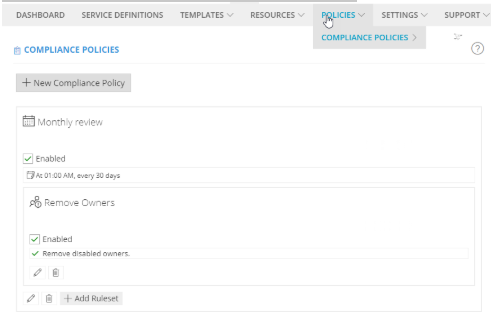
- In this example, 'Monthly review' is the name of the Policy and 'Remove Owners' is the name of the Ruleset
- Click the bottom edit button to apply changes to the Policy
- Edit the Policy Name, description or icon
- Edit the Policy Schedule
- Disable the Policy
- Apply limited changes to the Ruleset associated with the Policy
- Change to another Ruleset (edit)
- Delete the Ruleset
- Add a Ruleset
- Check the Service Definitions to ensure the Compliance has been updated
*If the schedule is overridden at the Service Definition level it will always keep the Service Definition schedule
Edit Existing Rulesets and Rules
Use this method if a rule needs to be changed on an existing ruleset.
NOTE: this will be applied to all Policies and therefore Service Definitions the Ruleset is linked to.
- Go to Admin > Policies > Compliance Policies > Rulesets
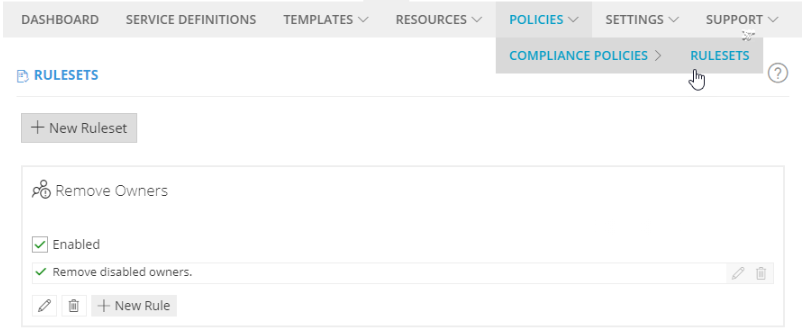
- Click the bottom edit button to apply changes to the Ruleset:
- Edit the Ruleset name, description or icon
- Disable a Ruleset
- Apply changes to the Rules associated with the Ruleset
- Edit the configuration of the Rule, the name cannot be changed.
- Disable the Rule
- Add a New Rule
- Delete the Rule
-
-
NOTE: Rules cannot be copied from one Ruleset to another. If you have rules that will be applied across multiple policies put them in their own ruleset