Cause
This error will occur if a service account is used for group creation and certain group settings are being applied in the service definition associated with the failed request.
Specifically, the error will only occur if either the settings "Allow external senders" and "Auto subscribe new members" are configured for the service definition > Group Settings tab.
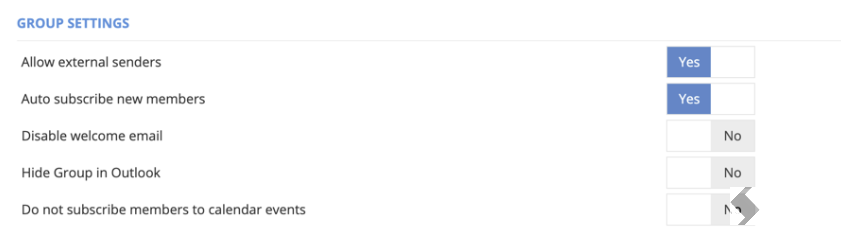
ProvisionPoint has built-in handling for Microsoft returning an 'invalid group' error when trying to apply these settings. This means the Group has not been provisioned enough to apply the settings.
By default, ProvisionPoint has a retry timeout value of 5 minutes, before logging an error in the job queue as shown above.
Resolution
In each service definition the group settings tab, defines the retry timeout. This can be extended to allow more time to apply the settings, the time required will vary for for each tenant.
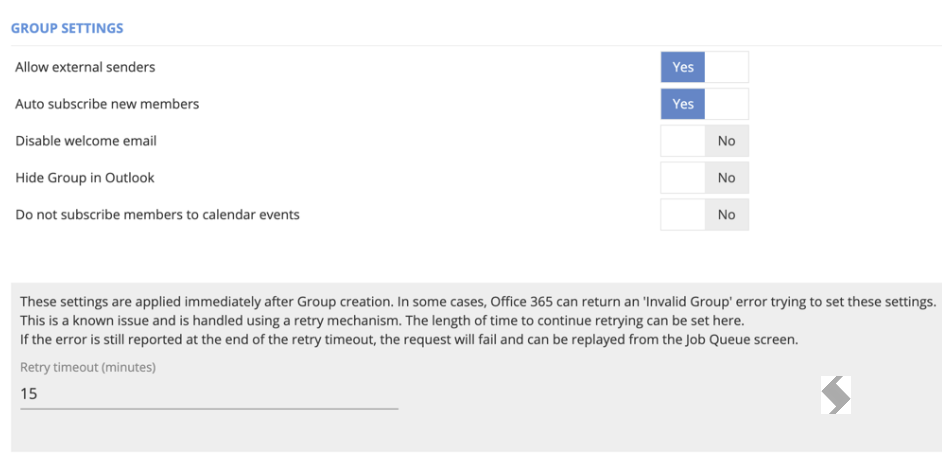
Once the Retry timeout is set, save the service definition and replay your request.