Please review the Product Roadmap to see future Releases: Product Roadmap | SnapOn Software | Software That Clicks
Below is a list of the new feature and maintenance releases for Forms in 2026
Version 3.3 Released June 21, 2026
1-Blocked Features Management
This feature allows tenant administrators to control which Forms features are available across their organization.
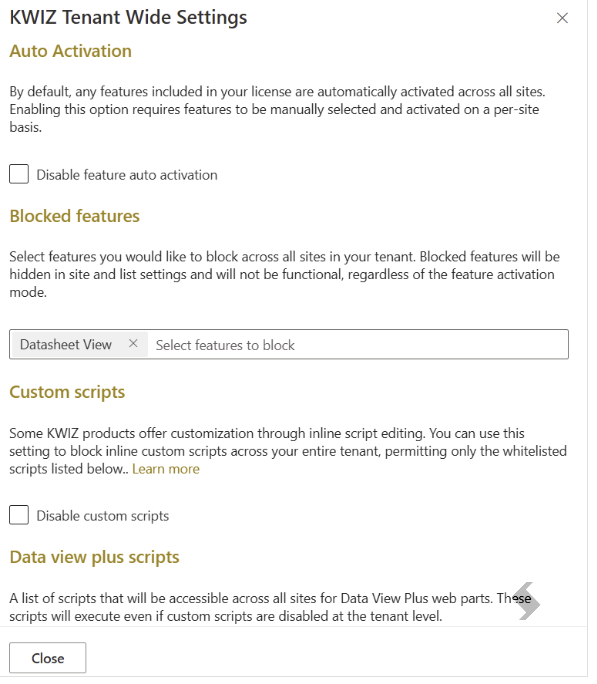
By using Tenant Wide Settings, administrators can block specific features and prevent them from being used on any site or list within the tenant. This is particularly useful for organizations that need to restrict functionality based on governance, compliance, or internal policies.
If a blocked feature was previously configured, its settings are preserved and automatically restored when the feature is unblocked.
Key benefits:
- Centrally manage Forms feature availability across the entire tenant.
- Restrict features that do not comply with organizational policies.
- Preserve existing feature configurations when a feature is blocked.
- Automatically restore feature settings when a feature is re-enabled.
- Clearly identify features that have been restricted by your organization.
To block a feature:
- Open KWIZ Apps, click the ellipsis (...), and choose Tenant-Wide Settings.
- Under the Auto Activation section, locate Blocked Features.

Additional information is available: Blocked Features Management
References: 2455
2-External Data source Field Association
External Data Connector Columns can now be linked not only to Choice and Multi-Choice columns, but also to Single line of text and Multiple lines of text columns.
This enhancement allows organizations to use external data (such as dropdown values) while keeping their existing SharePoint column types unchanged.
Key benefits:
- Use external data sources with existing text-based columns without changing column types
- Maintain compatibility when migrating forms from other solutions
- Preserve all existing data with no conversion or data loss
- Support dropdown-style fields backed by Single line of text columns
References: 2285
3-Open Repeating Row Documents in New Tab
A new Open in new tab option is now available for Repeating Row documents when editing an item.
This allows users to open and work with repeating-row documents in a separate browser tab, making it easier to review and edit content side by side.
Key benefits:
- Open Repeating Row documents in a new tab directly from the edit form
- Improve usability by matching the experience already available in view mode
- Make it easier to review and edit documents without losing your current work
- Reduce navigation steps when working with complex forms
Reference: 1826
Maintenance - Expand to see stability fixes and enhancements
Enhancements
- 2472 — Added hint positioning support (above, below, left, right) and HTML hint content to Modern Forms field API.
Stability Fixes
- 2428 — KwizcomControllerField no longer appears in list views embedded in pages in SharePoint Server Subscription Edition (on-prem).
- 2453 — Fixed conditional formatting for URL/Hyperlink columns in Data View Plus not evaluating correctly.
- 2456 — Fixed an issue where legacy loader files in Site Assets could become outdated and reference unavailable resources.
- 2365 — Fixed Multiple calls to SetFieldsState no longer overwrite previous configurations; field states are now correctly merged and preserved across calls.
- 2467 — Non-admin users no longer see the RER warning, and event receivers are now correctly registered during setup.
- 2467 — Non-admin users no longer see the RER warning, and event receivers are now correctly registered during setup.
- 2468 — Fixed an issue where LVP Filter Multi-Select failed to select values containing commas.
- Resolved issues in SharePoint On-Premises Forms apps: To apply these fixes, install the latest Foundation WSP package (attached for your convenience).
- 2447 — CORS handling in KwizCom API endpoints has been secured by validating the Origin header. CORS headers are now only returned for matching SharePoint origins.
Expand here to see subsequent patches for v3.3
v3.3 Patch Published Aug 11, 2026 [20260724]
- 2422 – Fixed an issue where the Workflow Copy Item activity could create duplicate items instead of a single copy. Added the Disable Event option to prevent recursive event execution during the copy process.
- 2477 – Improved the performance, reliability, and memory management of Batch PDF Generation. Optimized data collection, PDF processing, resource cleanup, and attachment handling to significantly improve generation speed for large PDF batches. Enhanced logging has also been added to provide detailed diagnostics, including processing times, page counts, memory usage, and operation context. This improvement requires Client Agent v1.2.0.22.
- 2488 – Fixed a scrolling issue on physical mobile devices where form scrolling would stop at the Signature section, preventing users from reaching the Attachments section and Save button. Forms now scroll correctly through all sections on mobile.
- 2537 - Fixed an issue where User Custom Actions experienced slow performance due to unfiltered list settings lookups. Actions now load faster by filtering directly on the Custom Action ID.
- 2539 – Enhanced the Workflow History panel to improve navigation of long workflow histories. Users can now search workflow history entries by title, filter by Event and Status, navigate results using pagination (five parent workflow entries per page), expand parent entries to view related child activities, and clear all active search and filter criteria with a single click.
- 2545 – Fixed an issue where a Form could not be saved when the Repeating Rows "Add new item" option was disabled and a row was left empty. Forms now save successfully in this configuration.
- 2547 – Fixed an issue where updating an item through a user-triggered workflow could fail with a Version Conflict message. The fix adds retry logic (requires Foundation 169).
- 2512 – Fixed an issue where SharePoint attachments with file names starting with or containing the # character could fail to open correctly from the List View Web Part.
- 2552 – Fixed an issue where the Workflow History button was not clickable due to missing JavaScript files on the new production server. The deployment process has been updated to ensure all required files are included.
v3.3 Patch Published July, 19 2026 [20260624]
- 2497 – Added support for selecting the Attachments field when configuring Cell Visibility in the Form Builder.
- 2495 – Fixed an issue where Multi-Choice field values were not displayed in email bodies.
- 2494 – Fixed an issue where the Copy Item workflow activity did not return the newly created Item ID.
- 2490 – Fixed an issue where the Add Item workflow activity copied date values one day earlier than expected.
- 2480 – Fixed an issue where workflows copying items with attachments in Modern UI could execute before attachment uploads completed. Workflow execution is now automatically delayed until all attachments are available, ensuring attachments are copied successfully.
- 2474 – Fixed an issue where lookup column values were not displayed correctly when Column Permissions were applied.
- 2487 – Fixed an issue where the Scheduled Workflows timer job could fail to register after upgrading to v163 when an existing Scheduled Workflows timer job was already present.
- 2484 – Added options to KWIZ Forms Display mode, which allows the selection of Classic and Modern in Classic If Forms mode is Off also the Classic apps buttons open the Modern Settings now
- 2496 – Removed the unnecessary Global Admin consent requirement for the Script and Style Editor.
- 2481 – Fixed an issue where system column tokens such as [Author] and [Editor] were not displayed in Print Preview. Header and footer fields now also support standard field tokens such as [Title].
- 2502 – Fixed an issue where Workflow History was not displayed correctly.
Enhancements & UI Improvements
- 2492 – Improved the Validation Summary by displaying the associated field name for each validation error.
- 2489 – Added Attachments validation errors to the Validation Summary, ensuring they appear alongside other field validation messages.
- 2454 – Added a Fields/Tokens Selection dropdown to workflow activities, making it easier to insert fields and workflow tokens during configuration.
- 2383 – Added support for Previous Value in Workflow and Activity Group Conditions, allowing workflows to detect field value changes and state transitions using item version history.
- 2503 – Improved the parsing of Output Variables in Workflow Summary Activities to ensure output values are processed correctly.