When configuring Compliance Policies in ProvisionPoint, Rules are created and added to ruleset groups to define what checks will be run.
This article will explain what Guest Access mismatch is and the rules that are available.
What is Guest Access?
Guest Access in Microsoft 365 lets you collaborate with people from outside of your organisation, by granting them access to your tenant, group conversations, files, calendar invitations, and the group notebook. Access can be granted natively in Microsoft by any Group Owner. Examples of guest users may be partners, clients or suppliers.
For your M365 Groups there are options that define if Guest Access is enabled or disabled for the Group.
If Guest access is disabled, no guests can be invited into the Team. If you also want to manage external sharing this is a different policy that can be configured to compliment Guest Access.
Setting Guest Access in ProvisionPoint
Within our app, the Guest Access permission can be configured within each Service Definition.
This can either be set to:
- Disabled - Guest users cannot be added
- Enabled - Guest users can be added.
- Not Set - Will be the M365 default for the tenant
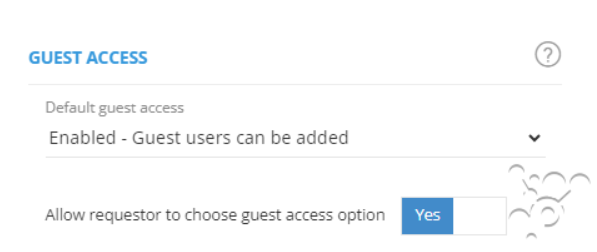
There is an option to allow the person making the request to choose what this setting will be set to.
Guest Access can only be configured for Group related workspaces. If you are creating a non-group related site, then this option will not be shown.
What is Guest Access Mismatch
A guest access mismatch allows you to check the Guest access permission assigned in O365 or ProvisionPoint and compare it to the configured set in our rules.
If they do not match the configuration the workspaces will be flagged as non-compliant.
If you want to ensure that the Guest Access is allowed (or not) on your Groups related workspaces, you can use the Compliance Policy rules to look for mismatches.
Define the mismatch value to look for and let the scheduled policy store or notify admins or owners of non-compliance, or automatically force a change
Examples include:
- Check any M365 Groups or Teams that are linked to internal only Service Definitions for Guest Access enabled mismatch.
This will flag any workspaces that should not allow guests to be accessed. - Ensure ProvisionPoint and O365 are aligned
Available Rules
|
Rule Name
|
Description
|
|
Guest Access Mismatch - Report
|
Report only on the mismatch that is configured, the results will be stored in the policy job queue or can be extracted via API
|
|
Guest Access Mismatch - Notify
|
Send an email to configured people about the non-compliance, this email will include content defined in the rule. Additional configuration will be needed. Read the Configure Notifications for Notify Rules article for more information
|
|
Guest Access Mismatch - Align
|
Align to M365, Provision Point instance, a defined value and more
|
We always recommend starting with a Report rule to ensure the policy brings back the results you expect before applying other rules.
Mismatch Types
The mismatch you choose will set what is going to be flagged as non-compliant:
|
Mismatch Type
|
Description
|
|
Instances
|
The O365 workspace does not match the service instance shown in ProvisionPoint Workspaces Directory info
|
|
Service Definition Default
|
The O365 workspace or the service instance do not match the service definition default
|
|
Transform Tag
|
The O365 workspace or service instance do not match a transform tag value. A transform tag would be defined in a lookup or as a request variable in ProvisionPoint workspaces. This value would be used to set the Guest Access at provisioning.
Add the name of the request variable or lookup to the Mismatch value
|
|
Defined Value
|
The O365 workspace or service instance do not match the defined value - either set to Enabled or Disabled
|
Aligned Value
If non-compliance is found the align type will set what changes will be applied:
|
Align Type
|
Description
|
|
O365 Workspace
|
Will set the service instance to match the O365 setting
|
|
Service Definition Default
|
Will set the O365 workspace and service instance to match the service definition default
|
|
Service Instance
|
Will set the O365 workspace to match the service instance setting shown in Info
|
|
Transform Tag
|
Will set the O365 workspace and service instance to match the value set by the transform tag set in Align value. This will be the name of the request variable or lookup
|
|
Defined Value
|
Will set the O365 workspace and service instance to match the Align value - either Enabled or Disabled
|
Check the Result
Once a compliant policy is run, you can check the result in the Job Queue and Timeline to see if it is non-compliant.
Read articles in the Job Queue
section: