Overview
Sometimes, you may want a workflow to redirect a user back to a specific tab in a form after the workflow completes. This article explains how to set this up using a User Triggered Workflow.
Step 1: Create a User Triggered Workflow
- Go to your workflow settings and add a new workflow.
- Provide a workflow name and enable it.
- Set up the button caption, icon, and confirmation message according to your requirements.
- In the Redirect on complete field:
-
- Click Insert Token.
- Select View Item Tab from the token list.
- Choose the tab you want the workflow to redirect to.
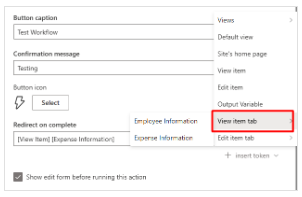
Step 2: Encode the tab name using any online encoding/decoding tool
- You can use this linked Tool for example. Add the name of your tab in this tool and click on encode.
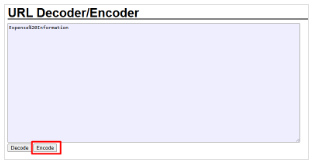
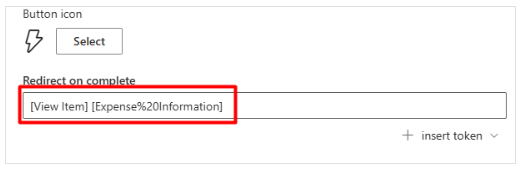
- Copy the encoded text and paste it in the Redirect on complete field in place of the original tab name.
Following the example in the screenshot above, the "Redirect on complete" in the workflow setup should like the screenshot below
Step 3: Adding the code to the Script Editor
Accessing the Script Editor. Open a list item in either view or edit mode.
Click the gear icon at the top-right corner of the form, then select Script editor.
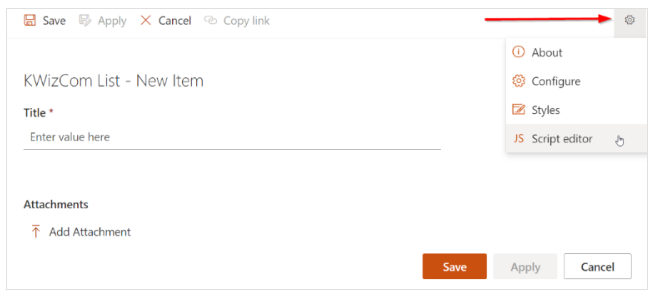
In the script editor, paste the following code:
//#region Set fields appear read-only
//********************************************
// Set fields appear read-only
//********************************************
kwizcom.ModernUILibrary.FormPage.OnReady("setDefaultTab", function (form) {
    debugger;
    let defaultTab = getAplfeTab();
    if(!defaultTab){
        defaultTab = getBracketText();
    }
    if(defaultTab){
        form.SetTab(defaultTab);
    }
});
//#endregion Set fields appear read-only

function getAplfeTab() {
    let value = null;
    // 1. Try normal query string
    const searchParams = new URLSearchParams(window.location.search);
    value = searchParams.get("aplfe_tab");

    // 2. If not found, try hash parameters
    if (!value && window.location.hash) {
    const hash = window.location.hash.substring(1);
    const hashParams = new URLSearchParams(hash);
    value = hashParams.get("aplfe_tab");
    }

    if (!value) return null;

    // Remove "tem][" from the start if present
    if (value.startsWith("tem][")) {
    value = value.substring(5);
    }

    // Decode URL encoding
    value = decodeURIComponent(value);

    return value;
}
function getBracketText() {
    const match = window.location.href.match(/\[(.*?)\]/);
    if (!match) return null;

    return decodeURIComponent(match[1]);
}
Result
After the User Triggered Workflow completes, the user will automatically be redirected to the tab specified in the workflow settings.