Compliance Policies are scheduled checks that can be run on workspaces managed by ProvisionPoint (created or imported workspaces).
The checks that can be run vary depending on the compliance policy type selected.
The policies can check ownership, guest access, external sharing, guests, naming conventions and more in managed policies.
Expiry policies can also be used to change the expiry date set on the workspaces, by looking at the Team messaging or Site activity.
Build your policy checks and assign them to the service definitions in ProvisionPoint, either create reports visible in the Policy queue, notify owners or admins of the non-compliance or automatically enforce a change to keep workspaces aligned to your requirements.
Compliance policies are made using rules, that will define what equals non compliance for you, and the action that should follow:
Types of Policies
There are currently 2 types of policy available:
|
Managed Compliance Policy
|
Expiry Compliance Policy
|
|
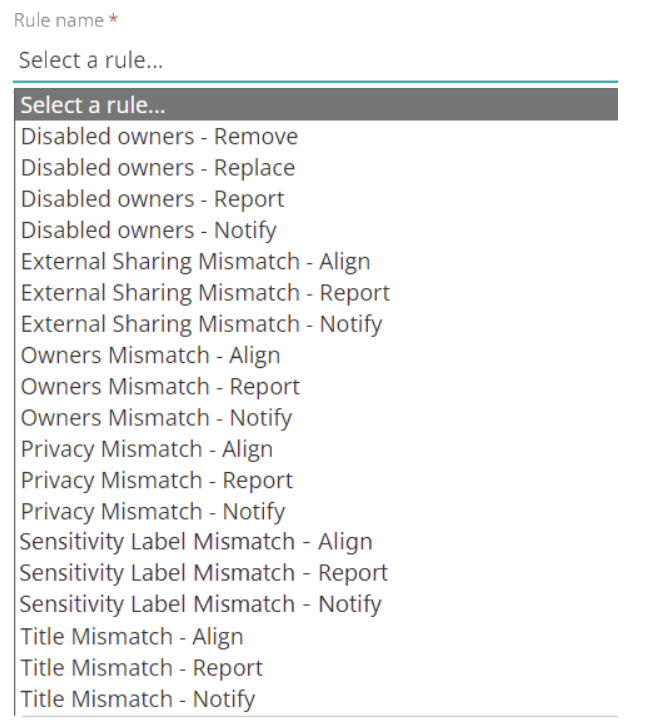
Check the state of the workspaces in M365 and compare them to our instance. These can be used to ensure a synchronisation between M365 and ProvisionPoint is maintained or allow specific checks on your M365 environment.
|
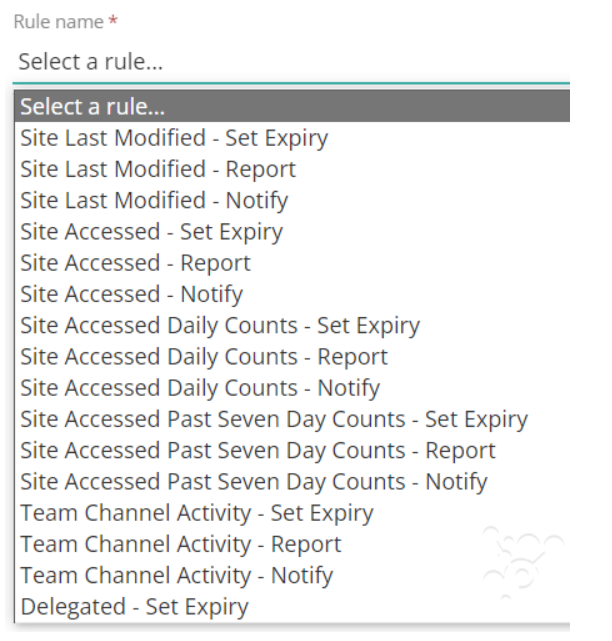
Check the expiry date and if it matches the configuration, will manage the expiry date set, the expiry policy can check for workspace activity or inactivity.
Only one Expiry policy can be assigned to a Service Definition.
|
|
Disabled Owners
|
Site Last Modified
|
|
External Sharing Mismatch
|
Site Last Accessed
|
|
Privacy Mismatch
|
Site Accessed Daily Counts
|
|
Title or URL Mismatch (Naming Conventions)
|
Site Accessed Last 7 Days
|
|
Owner Mismatch
|
Team Channel Activity
|
|
Deletion Mismatch
|
Delegated - complete multiple checked before making a change
|
|
Sensitivity Label Mismatch
|
|
|
Inactive Guests
|
|
|
Guest Access Mismatch
| |
Policy Rule Types
There are a number of rule types available for each rule, when you select the rule you can choose between:
- Report - will store the information in the timeline, policy queues and API calls
- Notify - will send an email to the service definition admins, owners, requestor and any other named people or groups.
Additional configuration will be required to define the recipients - Actions - Will perform an action on either M365 workspace or the ProvisionPoint instance. Each rule will have different options for this including remove, replace or align.
- Set Expiry - will make a change to the expiry date applied to workspaces.
Group the rules in Groups to help define the order they will run in and create as few policies as possible.