Relevant to: KWIZ SharePoint Online/2019 & CMS365 apps customers
Environment picker
When KWIZ releases new SharePoint Online version, we 1st release a BETA version to our beta test environment called fastring (“Fast-Ring”).
Customers who wish to check-out KWIZ apps beta versions before they are published to production, can connect to the KWIZ fastring environment by using the KWIZ Environment Picker browser extension.
This extension simply monitors network requests to KWIZ CDN servers and redirects the to point to KWIZ fastring CDN server’s IP address instead.
This change only affects traffic in the browser profile it was used, and does not affect traffic on other apps/browsers.
Important!
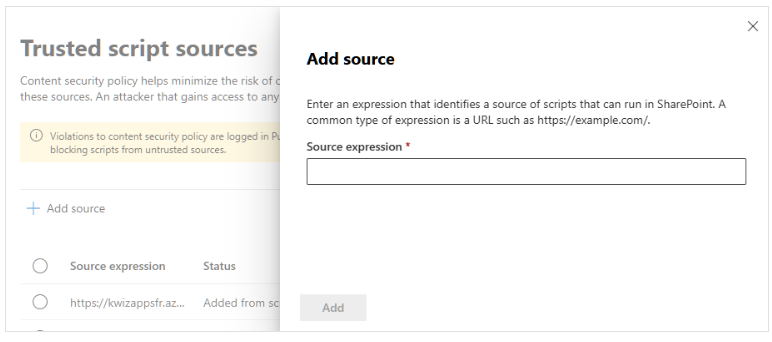
Due to Microsoft's CSP policies, if you are on SharePoint Online, you will also have to add our fast-ring server to your allowed script sources. See instructions below.
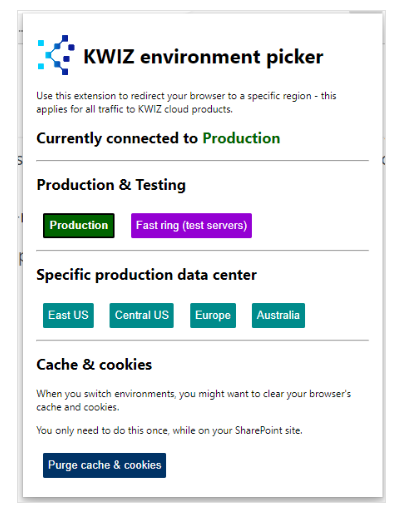
After you add this extension to your Chrome browser, switching between KWIZ production and fast-ring environment is easy:
1. Click the KWIZ Environment Picker extension button
2. Select the environment you want to connect to:
Add script source - Online only
Depending on which source you are connecting you, you will need to register the following servers as trusted script sources:
Follow these steps to add the servers that you need:
- Open the SharePoint Admin center
- On the left navigation, select Advanced / Script sources
- Under Trusted script sources click Add source
- Paste the server address into the source expression
- Click Add