When configuring your Policies in ProvisionPoint Rules need to be added to ruleset groups. This article will explain what a disabled owner is and list the rules that are available.
What are Disabled Owners?
A disabled owner is any account that has been assigned as the owner of a Workspace and is blocked from sign-in via the M365 admin centre or Azure Active Directory.
When blocked the user will not be able to login and is often part of a leavers process for IT departments.
What are the Disabled Owner options?
In ProvisionPoint we list the owners of workspaces either via our {Owners} tag or using people picker columns that have been created and added to our request forms.
As part of the Column setup you can define if Disabled accounts are allowed.
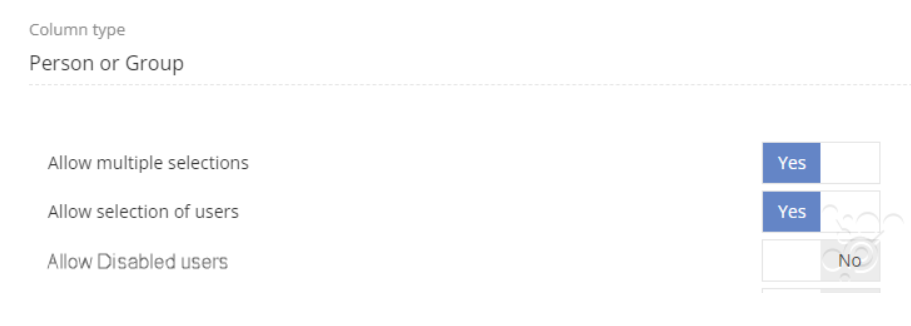
This setting will prevent disabled accounts being viewed at the point of request.
What will the Disabled Owner Rule achieve?
Once workspaces are created the owners assigned to the workspace may change over time and people will leave the company.
It is good practice to review the workspace to find any owners that are disabled.
Use compliance policy rules to either
- report,
- notify other owners or admins that the owner needs to be updated
- Replace or remove the disabled owner
Use the rules to look for any disabled owners or for orphaned Sites or Teams if both owner are disabled.
Available rules:
|
Rule name
|
Description
|
|
Disabled Owners - Report
|
Report and display any owners that are disabled, based on the configuration set
|
|
Disabled Owner - Notify
| Send an email to configured people about the non-compliance, this email will include content define in the rule. Additional configuration will be needed, read the Configure Notifications for Notify Rules article for more information |
|
Disabled Owner - Remove
| Will remove any disabled Owners found il be removed, if the column is mandatory this may fail as the owner cannot be removed. In this case use replace instead |
|
Disabled Owner - Replace
|
Will replace any disabled owners with a user you define in the configuration. The upn must be provided.
|
We always recommend starting with a Report rule to ensure the policy brings back the results you expect before applying the action rules (Align)
Check the Results:
Once a Compliance policy is run you can check the results in the Job Queue and in the Timeline if it is non-compliant.
Read the articles in the Job Queue section:
A Service definition can have minimum or maximum number of owners assigned or a base group set up. If the changes made by the Owners mismatch do not meet these requirements the compliance check will fail. This is to force the Ownership to be reviewed fully before a change is made.