To restrict permissions in Microsoft, ProvisionPoint can be used to limit Owner permission to be members instead, but still allow them to act as Owners in the app, receive notification & make changes via Actions.
Restricting permissions can be useful to ensure:
- No excess of Teams, Sites and Communities are created
- Prevent deletion or archiving unless approval is given
- Enforce Archiving or deletion via lifecycle policies
- Give Admins control over what Owners can do in Microsoft via Actions
The following setup will achieve these desired results:
- Set 'allow everyone to create Groups' to No in Group settings. Groups Settings for Tenant
This will prevent user from creating Teams, Sites, etc... that are Group connected in Microsoft. It is not mandatory but does help with controlling where creations are triggered from.
This is a tenant wide setting and will affect any M365 Teams, Sites, M365 Groups, Planners and Communities
- Manage Owner permissions via form fields. Configure the columns and forms needed
This means the Owners defined in the request will loose the Owner's elevated permissions in Microsoft and will have member rights only. Read Use the Request Form to manage Owners & Members
-
Limit Owner access in Microsoft to be members
- Open the Form and edit the Owner columns created.
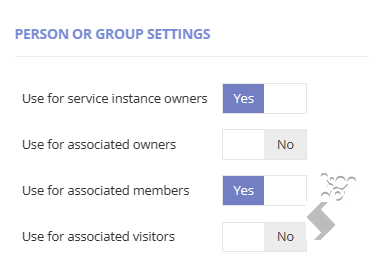
- Change the Person or Group settings to be
- Use for Service instance Owner = Yes
- Use for Associated Member = Yes
- All others = No
-
Set the Service Account to Group Operations in App Settings.
When a new Group, Team, Site or community is created, there must be at least one owner. With the setup above non have been defined.
Setting the service account to be used for Group operations will:
- Make all Graph call request by the Service Account setup in Admin > Settings > Service Accounts
- Default the Service account to be the Owner of the Group and all associated items (Team, SIte, etc)
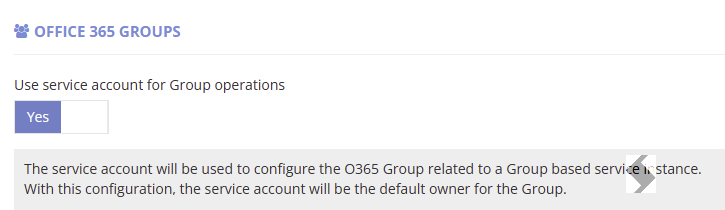
Once configured all requests will default the service account as the Group Owner and limit the Owner columns you setup to be Members.
The Sites Teams ... can now be managed using ProvisionPoint Actions.
Compliance Checks and Owner actions will not allow the Service account to be visible or removed.