Overview
Most KWIZ Forms features don't need access directly to your content, and rely on a user signing in to your tenant, gaining access to your data on behalf or your user.
However, some features used by KWIZ Forms may require KWIZ Apps server to access your information, without a user signed in. These actions will run on our server and may need to access your information.
For example, if you want to set up an event handler to send an email when an item is created, or running a scheduled action every day to notify users for delayed tasks.
We have put many safeguards to protect your data:
- We never store data on our servers. We load the information needed into random access memory, and purge it once the processing is done.
- When an action is executed, we first verify the settings on your site to make sure it was (and still is) configured by an authorized user on the site.
- All our code is running on Azure web applications, which communicates with your data inside the Azure private network, to protect against DNS and other network based attacks.
Granting permissions
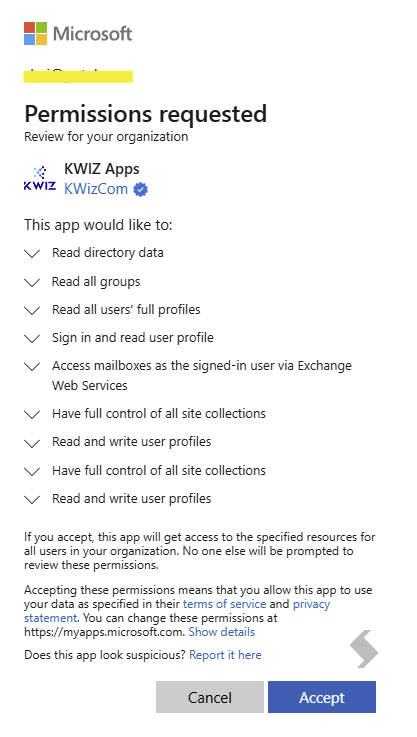
Granting permissions is easy, but requires your tenant admin to consent to the permissions.
There are 2 ways for your tenant admin to review and grant the needed permissions:
- In-app interaction: have your tenant admin visit KWIZ list settings or a feature page that requires server access, such as public forms, and have him complete the grant permissions flow.
- Have your tenant admin visit our online wizard, and grant permissions to SharePoint and Graph API: KWIZ foundation Install Wizard
In App Engagement
When visiting KWIZ list settings, you will see a prompt asking you to grant the needed permissions:

 If you are trying to configure a feature that requires server access, you will see this message:

 Click read more to open the grant-access dialog, which a tenant admin and use in order to review and grant the requested permissions:
Note: the popup content would change based on the feature you are trying to use

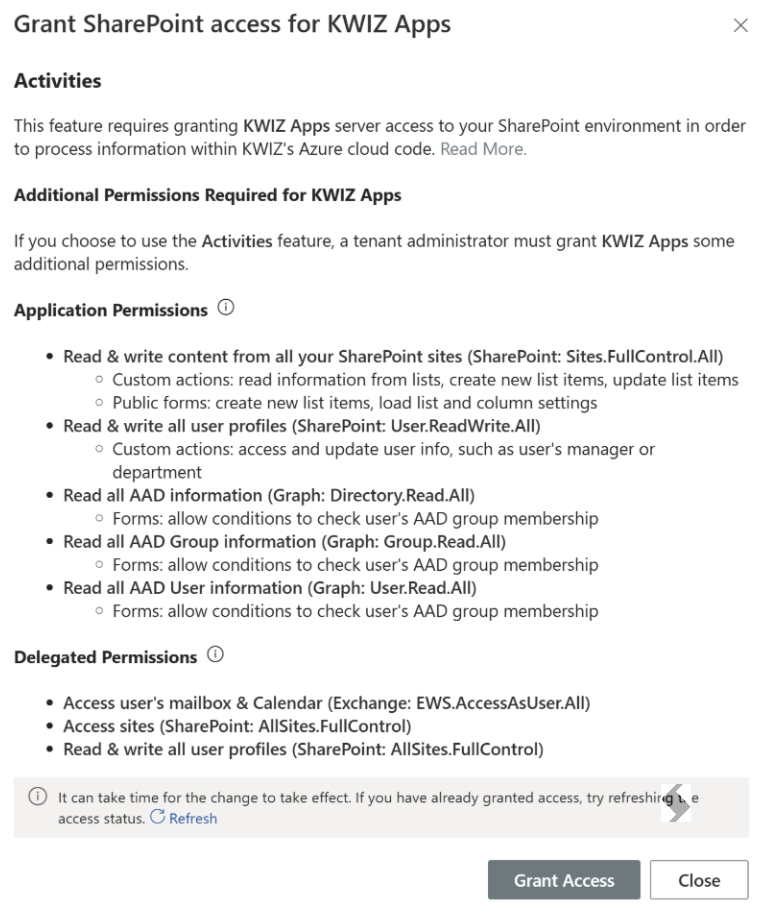
Azure AD grant permissions prompt
 Read more: https://learn.microsoft.com/en-us/entra/identity/enterprise-apps/grant-admin-consent?pivots=portal