Cause
Our team has investigated this issue with collaboration from Microsoft, and has found that this issue is traced back to Microsoft List Sync, which does not identify those customizations correctly in some cases.
This issue targets specific users on specific lists, because List Sync intelligently applies different caching and pre-loading based on the list profile as well as the user's usage and behavior.
What can I do?
Workaround
As a current workaround, there are a few things you can try to bypass List Sync and make your lists work.
- Visit feature settings by going to the KWIZ site settings, and choosing your list from the breadcrumb menu
-
- Open site settings
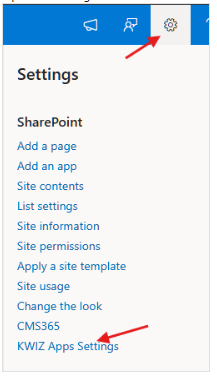
2. Select the list
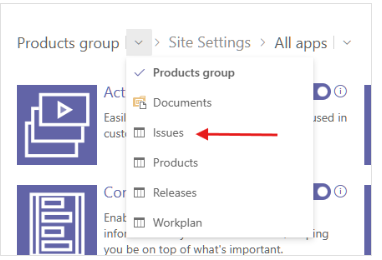
3. Disable List Sync on the specific affected list, while the issue is being resolved
-
- Visit the lists app
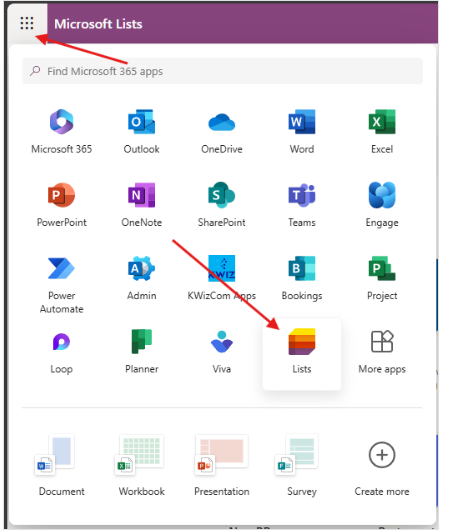
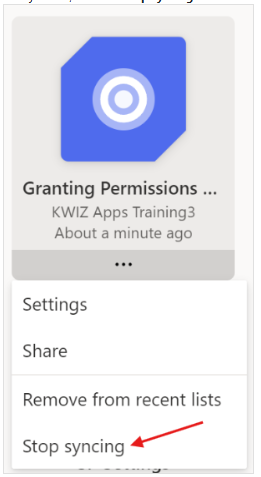
Find your list, and click Stop syncing on the ... menu
Refresh your list a few times until the issue is resolved
- Disable List Sync on your computer (not recommended for long term)
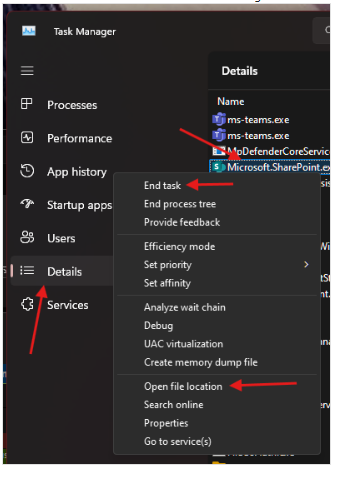
- Look for Microsoft.SharePoint.exe in task manager
-
- Open file location
- End task
- Rename Microsoft.SharePoint.exe to Microsoft.SharePoint.exe.disabled to prevent it from running
- Please note: this is not recommended as a long term solution as this disables the service and prevents it from running entirely
Follow the issue status
This issue is being discussed in this github thread
Please follow the thread for updates and to get more context