Create Team Channel template and link it to an Action
When defining a Channel in a Service Definition it is possible to use that Channel as a template that can be selected from the 'Add a Channel' Action, once a Team has been provisioned.
Enable Channel Templates
To define the templates that can be used in the action, go to Admin > Service Definitions > Channels
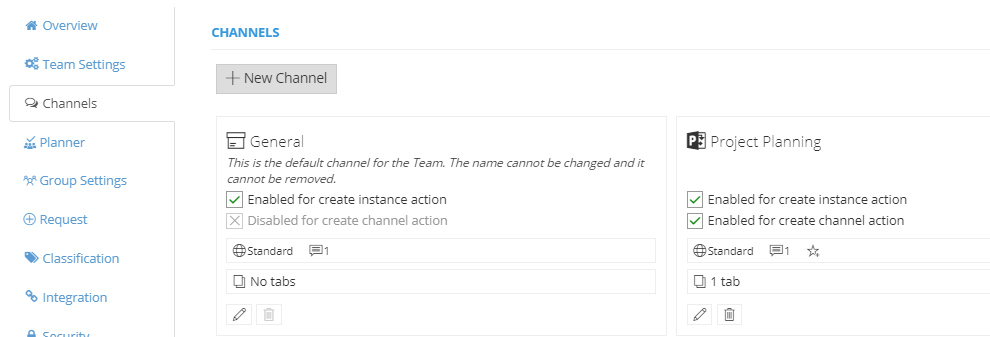
Either edit an existing channel or create a new one, set the toggle for 'Enabled for create channel action' to Yes
This will be displayed on the Channel overview:
Enable Create Team Channel Action
Go to Admin > Service Definitions > Actions > Content
Set the toggle for 'Create Team Channel' to On, this will allow your Team Owners to be able to select this action from the Directory Info page. If needed, an approval process can be applied and notifications.
Additional users or groups can be given permission to run this action, read the
What are Actions for more information about how to enable Action permissions.
Create a Channel using the enabled Action
Once the Team is provisioned the Actions can be accessed via Directory > Site Info > Actions > Content
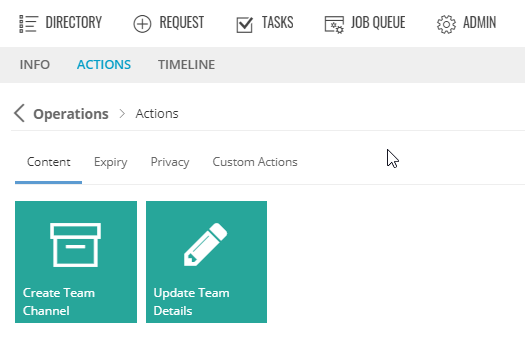
To use the 'Create Team Channel' Action click the tile, then select the template to use and complete the Name and Description.
Click Submit to create.