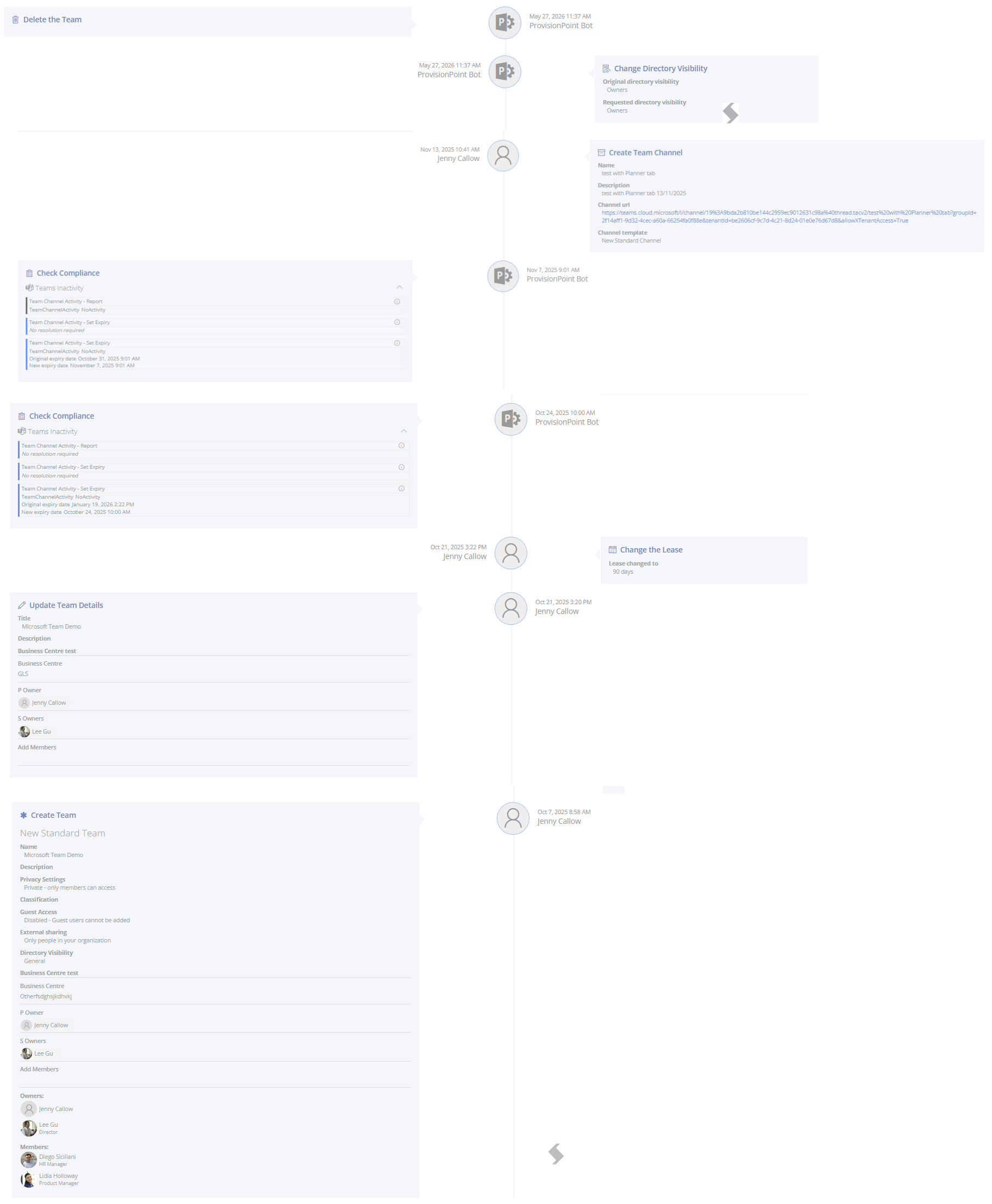
Each workspace that is created, imported or updated via Actions or compliance checks will update the Timeline. This will give you the full history of your workspace.
It will record:
- Who made the request
- When the request was made
- Which action was run (including Create)
- Additional metadata related to the request
- Show approvals
- Show automated jobs from lifecycle
- Show changes made by compliance rules if there is non-compliance.
Go to the Directory, click 'View details' on the relevant workspace, then Timeline.
From the Timeline example below we can see the following details:
- A new Microsoft Team was created
- The service definition it is linked to is called 'New Standard Team'
- The Security settings selected
- Guest Access was disabled
- External Sharing for the Site is set to only people in the organisation
- There was additional metadata filled in
- Who the Owners are
- The ProvisionPoint Directory visibility is NOT restricted
- There was no Approval needed
- An update to the metadata - Business Centre was updated
- 2 Compliance Checks were run, 1 of which found non-compliance, meaning the Teams was inactive for a period of time
- A New Channel was created
- The Directory Visibility was Changes so it is now restricted in ProvisionPoint to Owners only
- Finally it was deleted in Microsoft