Please review the Product Roadmap to see future Releases: Product Roadmap | SnapOn Software | Software That Clicks
Below is a list of the new feature and maintenance releases for ProvisionPoint in 2025
Each release will highlight if reconsent is required.
Patch Fixes and Auto Retry PnP Template
Release Date: 5th December 2025
Reconsent is not required
Expand to see more details...
PnP Auto Retry Feature
A new feature has been added to allow an auto retry for PnP templates. This will allow templates that are currently failing as a previous resource is still being applied that prevents the next PnP element to go through. If you have a PnP that normally fails but continues after a manual replay in the job queue, this feature will be a useful tool to implement.
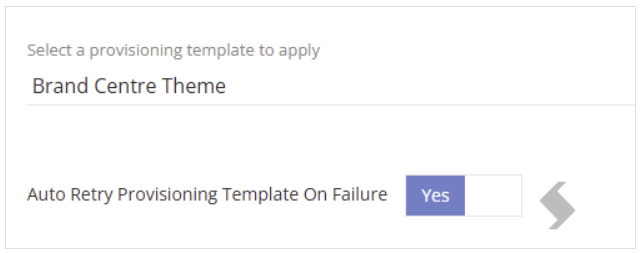

This will need to be configures on each Service Definition and will provide a toggle to enable if a PnP template is selected:
By design it will auto retry the PnP template options only 2 times. If this still produces a failure it will appear in the job queue.
Fixes:
- 12316 - Owner Mismatch Align rule failing to add users with error 'Sequence contains no matching element - Resolved
Reference: 12111, 12316
Version 1.6 Maintenance
Release Date: 20th November 2025
Reconsent is not required
Expand here to see the features and fixes
In this maintenance release we have resolved the following issues:
- Expiry Compliance Policies were running on workspaces every few minutes if any workspaces had no expiry date or did not meet the conditions of the Set Expiry rules.
- The license expiry message as this was not displaying correctly in languages, except UK English
- The 'delete' button for Members section in Shared/Private channel configuration now deletes the item as expected
- Retention Label is now setting as expecting in the default documents library when using our Lists feature
- Update Details action was not updating the Site name as expected
- Owner mismatch policy no longer removing and re-adding the same Owners when their upn has been changed
- PnP property "Theme" is no longer failing when the theme is added to organisation via Brand Centre
- Private Channels created by the 'Create Channel Action' failing because the Channel could not be found - This now has a longer time to check for the channel creation
References: 9169, 10020, 10113, 10220, 12026, 12035, 12037, 12152,
Version 1.5 Send Email (Additional Notification Providers)
Release Date: 10th September 2025
Reconsent is not required
Expand here to see the features and fixes
New Notification Providers
We’re excited to announce that you’ll be able to send email notifications from your own domain without the need for a 3rd party notification provider. We have added two new notification providers allowing you to use either your M365 tenant or an SMTP relay. This will help you ensure:
- Brand consistency in all communications
- Improved deliverability and trust
- Compliance with organizational security and anti-spam policies
- Avoidance of external third-party costs and limitations
Additional configuration steps will be required for these options and may require an exchange admin to assist. Send Email Notifications from your Domain
Go to Admin > Settings > App Settings > Notification Settings there will be the option to select 'M365 Mail' or 'SMTP provider' as the provider for all emails.
Email Notifications
ProvisionPoint can send email notifications to owners, admins or named people for a variety of reasons:
- Creation Successful
- Approval assigned or completed
- Job Failures
- Lifecycle stage reminders
- Actions successfully run
- Non-Compliance found
Once configured all email notifications that are enabled in the app will be sent via this provider. Read more about notifications in
Send Email Notifications via M365 Mail
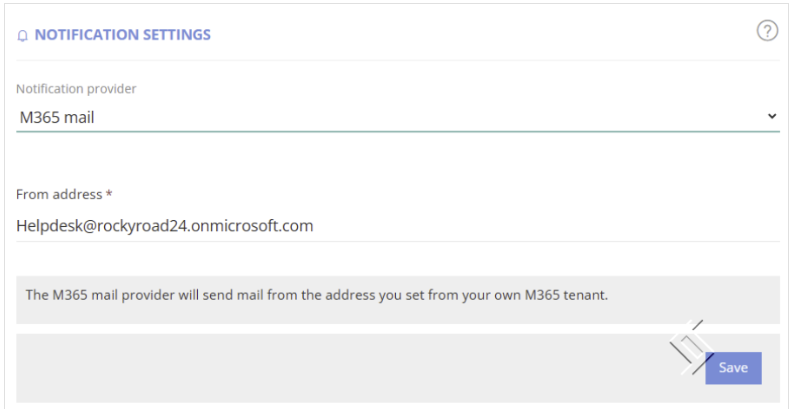
We have have added the option to send email notifications via your M365 mail. When chosen, additional configuration is required.
- Set the ‘From address’ to the email address emails will be received from. This MUST be an existing email account you have set up in your tenant.
- An Entra app registration is required with the additional ‘Mail.Send’ permission added and linked to ProvisionPoint via AAD App. (If you have an existing ProvisionPoint API app registration this can be used).
- An access policy to allow send on behalf of permissions may be required
More details on the configuration will be available on release.
Send Email Notifications via SMTP
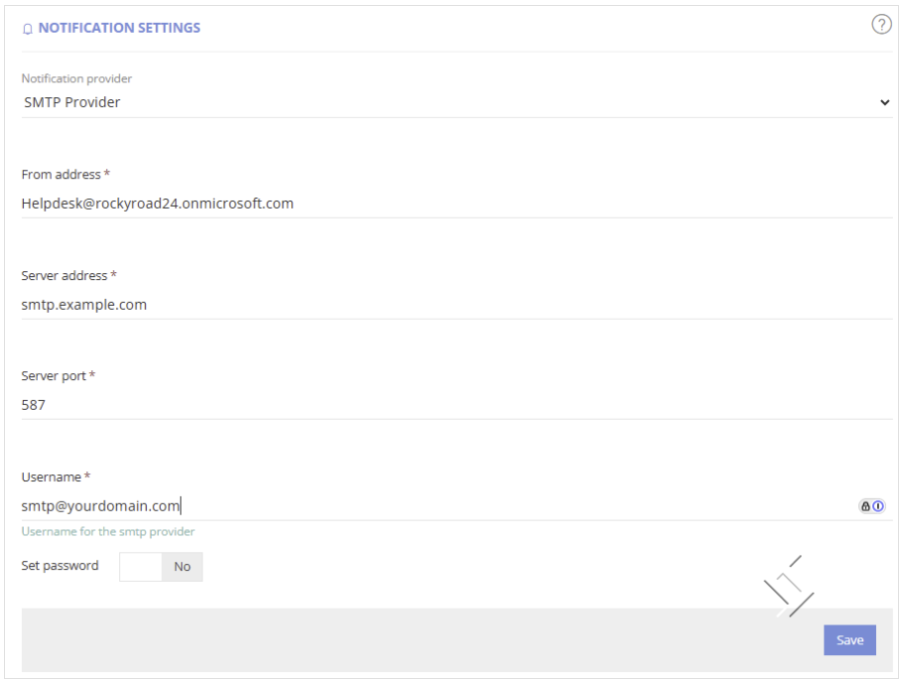
The SMTP will need to be configured for the account you wish to use as the send from email.
In the Notification Settings, set the
- ‘From’ address, this must be an existing email account you have set up in your tenant.
- Server address,
- Sever port,
- Username and password from your SMTP provider.
Version 1.4 Service Definition Owners
Release Date: 26th July 2025
Reconsent is not required
Expand here to see the features and fixes
Limit Owners selection to a Base Group
We regularly see reasons why owner selection needs to be restricted, adding a base group to your Owners setup for each Service Definition will give you options to:
- Only allow Managers to be set as an owner for Departmental Workspaces
- Allow Service Definitions to be created for a specific organisation, section, business unit. Allowing only people from the specific business unit to be selected.
- Restrict Guest accounts from being selected as owners
Read more in Ownership Settings
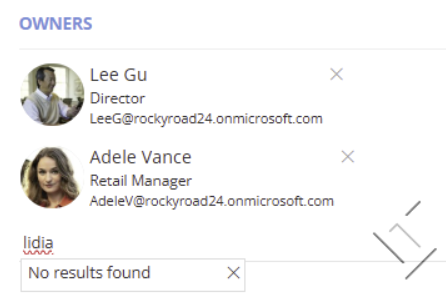
Open your Service Definition > Requests tab > scroll to Ownership settings and select the Base Group it should be linked to.
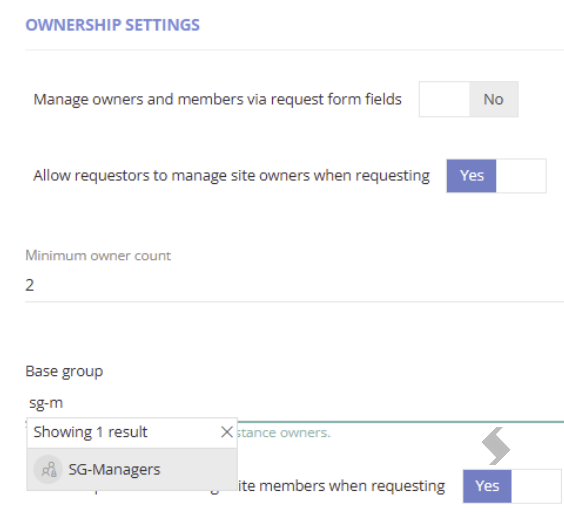
On the Request Form you will only be able to choose people from the groups selected.

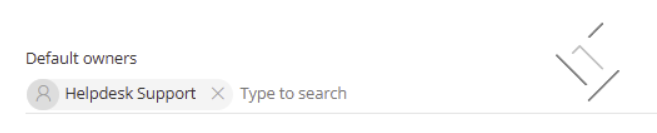
Hidden Default Owners
Set users as default owners on the workspace you are creating. The Owners will be added to the workspace in Microsoft, as a Service instance Owner in ProvisionPoint, but will not be displayed in the Owners list.
This will help to add admin or IT support to Sites that other Owners will not be able to see or remove.
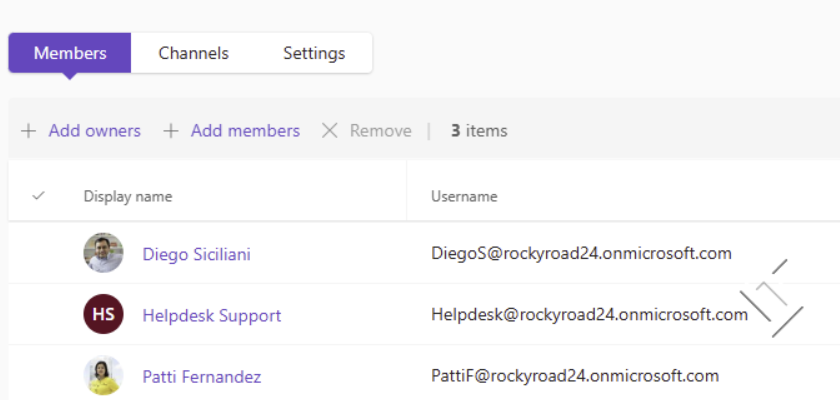
 Once created, ProvisionPoint's directory will only show the owners selected on the request form:


For the Team it will add the additional Owner

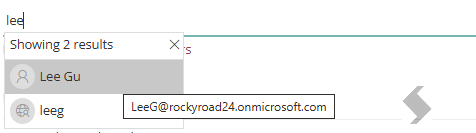
People Picker fields - hover to show email address
To assist customer in choosing the correct account in a people picker, you can now hover over the people to display their email address.
Email hover visibility is available in the request forms for Owners, Members or custom columns you have created

In the Directory:


In the timeline
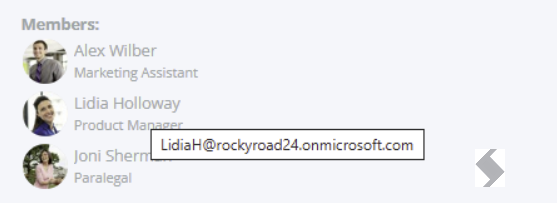

Anywhere a people picker is displayed.
References: 9260, 9263, 6355
Version 1.3
Release Date: 19th May 2025
Reconsent is required
Expand here to see the features and fixes
New Actions: Private & Shared Channel Membership
Provide workspace users and administrators with lightweight but effective tooling to manage ownership and membership of private/shared Teams channels via self-service actions in ProvisionPoint.
Introduce four new actions, extending the ProvisionPoint action model for Teams membership:
- Add Member to Private/Shared Channel
- Remove Member from Private/Shared Channel
- Add Owner to Private/Shared Channel
- Remove Owner from Private/Shared Channel
Maintenance
Stability Fixes
- We've fixed an issue for multi-geo tenants regarding hub-sites in satellite locations
- We've improved the stability of lifecycle actions, compliance policies and expiry compliance
References: Issues 8427, 9160, 9168, 9169, 9094
Patch Fixes
Release Date: 1st May 2025
Reconsent is not required
Expand here to see the features and fixes
This patch release includes stability improvements across many features.
Stability Fixes
- Channel already exist on replay requests
- Creating shared channels failure
- Missing approval tasks
- A fix for Multi Geo tenants with registering a hub site for satellite locations
- Ignoring system & service accounts in the owner mismatch rules
- Creating viva engage communities reported an error in some situations
References: 5562, 7756, 8284, 8399, 8427, 8926, 9034, 9121, 9256, 9275
Version 1.2 Maintenance
Release Date: 4th March 2025
Reconsent is not required
Expand here to see the features and fixes
UI/UX Fixes
- Missing icons: Missing Icons linked to request tiles
- Apply integration to new sites: Removed the settings toggle
Stability Fixes
- Fixed an issue highlighting minimum/maximum number of owners before clicking submit
- Fixed an issue with Export Policy Checks for a Scheduled Run
- Fixed the stability in some situations
- Fixed the archive lifecycle policy to complete correctly even if the site was already archived/deleted manually
References: 6888, 6889, 7659, 8348, 8432, 9014, 9078, 9230, 9243, 9254, 7041, 7042, 6859
Version 1.1 Modern List, Versioning, default Retention/Sensitivity Labels, Sync Content Types & Folders
Release Date: 15th February 2025
Reconsent is not required
Expand here to see the features and fixes
Additional Modern List settings
ProvisionPoint already allowed the creation of Modern Lists and Document Libraries, this could be found in the Service Definition > Lists tab.
We have now added the following functionality to give more setup options. To read how to create a new List or Document Library read
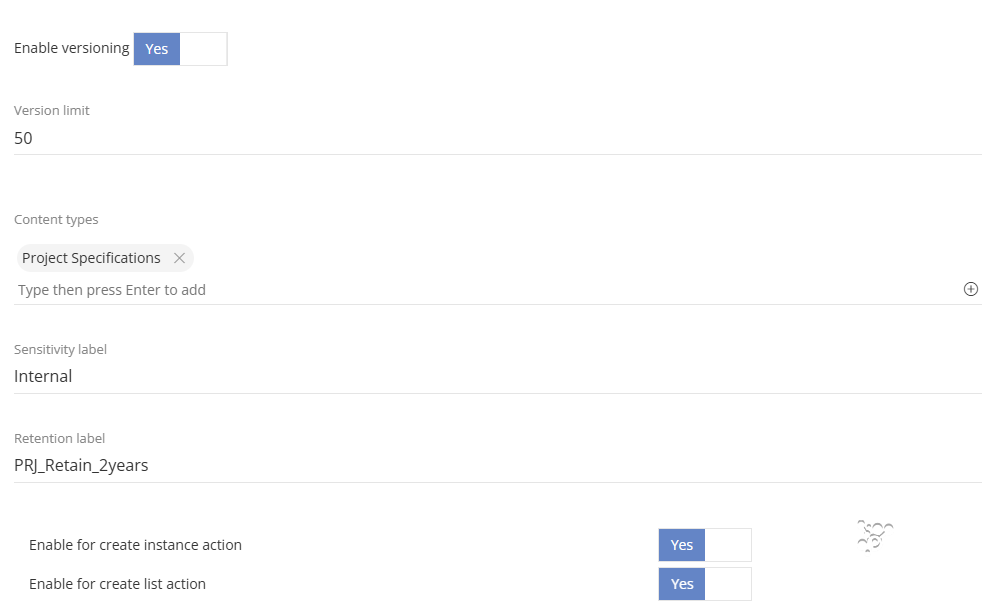
Update the default Documents Library
As well as creating new Lists and Document Libraries at the point of Provisioning, you can also setup and amend the settings for the default Documents Library.
This truly allows you to create an environment as you need it without using additional PNP, scripts or automation. 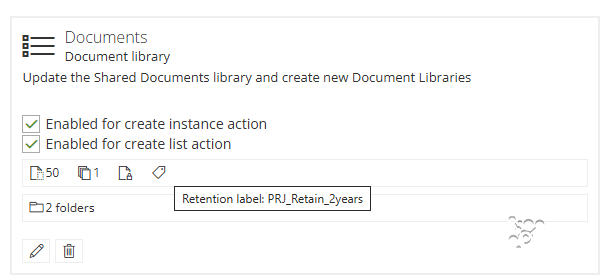
All of the new features below will also apply to the Shared Documents library
Please read Customise the Default Documents Library Setup
Enable Versioning & set Version Limits
Versioning in Document Libraries is becoming a more common practice and as a result we have added the options to enable versioning and set a limit on the amount of versions that will be saved.
Microsoft's default is 500, you can reduce this where needed, in the Shared Documents library or new libraries you create.
Read more in Create Modern Lists or Document Libraries
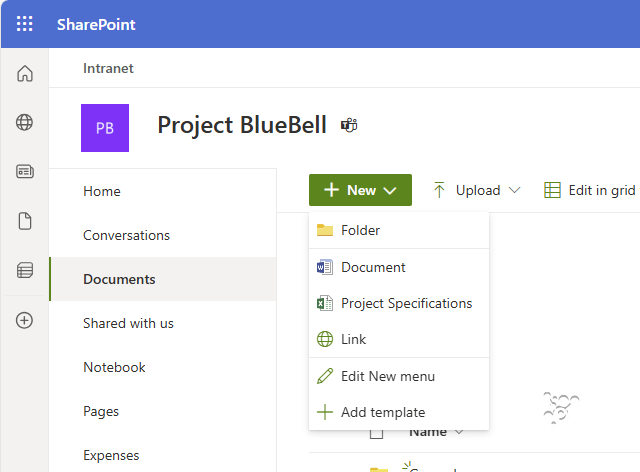
Sync Content Types from the Content Hub
Content Types can be created in the SharePoint Admin Centre to create specific columns and documents.
These need to be synchronised to each new Site and then applied to each Document Library or List for Teams and SharePoint
These options can now be achieved for existing Lists & Libraries or new.
Read more in Content Types & Sync to Document Libraries
Set the Default Sensitivity Label for the Document Libraries
Sensitivity of Documents is something we are asked about a lot, with the introduction of Co-Pilot the option to set the default Sensitivity label on a Document Library, at the point of creation, allows reassurance that a Sensitivity label will be applied to any documents created.
If you want to ensure documents that are confidential you can create the structure using ProvisionPoint and ensure the appropriate labels are setup.
Read more in:
Set the Default Retention Label for Lists and Document Libraries
Retention labels are an important part of governance, they allow documents to be retained or automatically removed based on your requirements. These are not the only options there are many options available.
Ensuring Documents are kept when it is a legal requirement is the perfect example of when to use them.
Applying them can be achieved in many ways with various policies. We find ensuring the List or Document Library level ensure that there is a label added that is appropriate, giving flexible options to how a Site is structured.
Use ProvisionPoint to set the default for lists and Libraries and use your adaptive scopes or static scopes, if you have them. The naming convention options can help to achieve this scope requirements.
Read more about Retention Labels here
Create Folders
Folders are something that can be created using PnP templates, however this is not always easy if you are not familiar.
We now allow the creation of Folders and sub folders in the Files associated to Teams or in your SharePoint Document Libraries.
Read more in the Create Folders in Teams or SharePoint
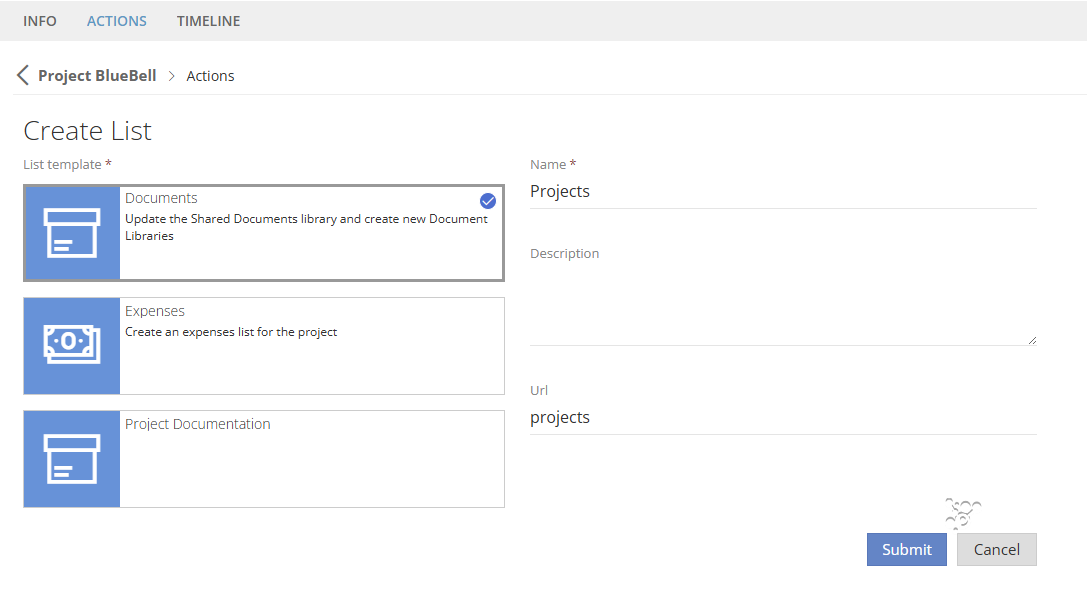
Create List Action
As we as creating new Lists or Document Libraries with configuration at the point of Provisioning, there is a Create List Action that will allow new Lists & Document Libraries to be created.
These will have the same settings as one of the List templates created. All ProvisionPoint actions can have email notifications or permissions defined so it can only be run by owners or admins.
Read more about actions here:
Maintenance
Stability Fixes
- We've improved the stability in some situations
References: 9136, 9137, 9138, 9139, 9140, 9141, 9158, 9159, 9170, 9171, 9173, 9174, 9177, 9186